

Last updated:
TL;DR: A professional small business website in Australia typically sits in the $3,000 to $8,000 AUD range for a quality build from a reputable provider, based on Australian 2025 pricing guides from Vrinsoft. If you want affordable website design australia business owners can rely on, focus less on the cheapest quote and more on whether the site will generate enquiries, support updates, and stay visible as search shifts toward AI-driven discovery.
You’re probably weighing a few uncomfortable options right now. One quote feels too high, another feels suspiciously low, and the DIY route looks cheaper until you realise you’ll be the one writing content, resizing images, fixing mobile layouts, and working out why the contact form stopped sending.
That’s where most small business owners get stuck. They don’t need a lecture on “digital transformation”. They need a straight answer on what a website should cost in Australia, what they get for that money, and how to avoid paying twice for the same job.
After a long time in this industry, one pattern keeps repeating. Businesses rarely regret paying for a well-scoped, well-built site. They regret buying a cheap one that looked fine on launch day and then underperformed, broke, or needed rebuilding far sooner than expected.
Breaking Down Website Costs in Australia
A business owner gets two quotes for what sounds like the same website. One is cheap enough to feel safe. The other is high enough to cause concern. Then the work starts getting listed properly. Page structure, copy support, enquiry forms, mobile layouts, SEO setup, tracking, integrations, training, and post-launch support. The quotes were never for the same thing.
That is why website pricing causes so much confusion. Businesses compare a template setup with a planned sales tool and call both “a website”.
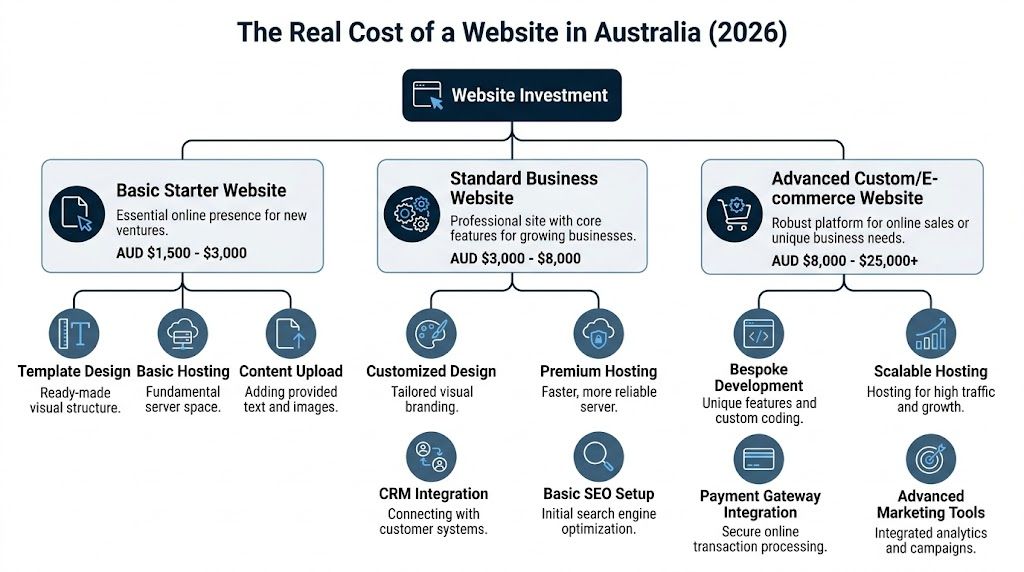
For a small business in Australia, the common range for a professional build sits around $3,000 to $8,000 AUD based on the pricing guide already referenced earlier. In practice, that range usually covers the point where a site stops being a placeholder and starts becoming useful. It should load properly on mobile, give you control through a CMS, support search visibility, and help turn visits into enquiries.
What the lower end usually buys
Lower-budget builds usually cover a small number of pages, a pre-built framework, light styling, and content supplied by the business owner. For some operators, that is enough.
A sole trader with one service, one location, and a simple goal can start there and still get value.
The trade-off shows up later. Cheap websites often leave out the planning that makes future growth easier. New service pages become awkward to add. Search structure is thin. Enquiry paths are generic. If you need the site to support AI search visibility, suburb targeting, bookings, or proper lead tracking later, the rebuild can cost more than doing it properly at the start.
Why the middle range is often the sensible spend
This is the bracket where many small businesses get the best return. The design is usually more considered, the page structure is built around how customers buy, and the backend is easier to manage after launch.
For example, a plumber may need separate service pages, location signals, quote forms, trust content, and clear calls to action. A restaurant may need booking links, menu presentation, event enquiries, and strong local signals. Those features are not decorative. They affect whether the site brings in work.
This is also the point where value matters more than sticker price. A cheaper site that cannot rank, cannot expand, and cannot support follow-up marketing is expensive in the wrong way. A well-scoped build costs more upfront but gives you a business asset that can keep producing leads.
If you want a clearer explanation of what increases or reduces project scope, this guide on unpacking the website creation cost covers the main pricing factors in plain English.
When the budget climbs
Costs rise fast once the website has to do more than present information. E-commerce, custom calculators, membership areas, CRM connections, booking systems, payment processing, and multi-location structures all add planning, testing, and support requirements.
That changes the risk profile as well. If a brochure site has a minor issue, it is inconvenient. If an online store, booking flow, or lead routing process fails, revenue is affected.
A useful way to separate project types is:
- Starter website: Suits early-stage businesses that need a credible presence and a simple enquiry path.
- Standard business website: Suits service businesses that want stronger lead generation, better search visibility, and room to grow.
- Advanced custom or e-commerce website: Suits businesses with transactions, integrations, or more complex user journeys.
What drives cost
Page count matters, but it is rarely the main reason one quote is much higher than another.
The bigger cost drivers are usually:
- Functionality: Bookings, quote tools, CRM links, payment systems, and custom forms all require setup and testing.
- Content work: Costs rise if the provider has to plan, write, edit, or restructure the messaging.
- Design depth: Custom layouts and brand-driven design take more time than adapting a template.
- Search readiness: Basic page titles are one thing. Service architecture, schema, internal linking, and location strategy are another.
- Future use: A site built for growth is structured differently from one built to sit unchanged for years.
One more factor often gets missed. AI is changing how people discover businesses. Search engines and AI assistants pull answers from clear, structured, trustworthy content. A site built only to look decent on launch day can struggle in that environment. A site built with strong structure, useful content, and clear service signals has a better chance of showing up where future enquiries begin. The same pressure is reshaping agency pricing models too, which is why breaking the agency paradox is worth reading.
A low quote can still be fair when the scope is limited. It becomes a problem when the missing work is the part that makes the website perform.
Choosing Your Path DIY Designer or Agency
A Brisbane plumber wants a website live by the end of the month. He can build it himself on a template, hire a freelancer, or bring in an agency. All three options can work. The right choice depends on one practical question. Is the site just an online business card, or does it need to bring in leads, support search visibility, and stay useful for years?

DIY works for simple sites and patient owners
DIY builders suit businesses with a narrow offer, limited content, and time to spare. A sole trader, new consultant, or local service with one suburb focus can get online without a large upfront bill.
The catch is that DIY only makes the build cheaper if your own time is cheap.
Business owners still have to make dozens of decisions that affect results. Page structure, copy, images, calls to action, mobile layout, form setup, indexing, and ongoing edits all sit with you. If the site needs to rank well, answer AI-generated search queries clearly, and turn visits into enquiries, the work expands fast.
I have seen plenty of owners save money on the build and lose it later in missed leads, weak messaging, or a rebuild twelve months on.
DIY is a fair option when the brief is small and you accept the trade-off. You spend less cash, but more time, and you carry more risk.
Freelancers can be excellent if the scope is clear
A good freelancer can offer strong value. You usually get direct communication, fewer layers, and more flexibility than a larger provider.
The weak point is coverage. One person might be a strong designer but average on technical SEO. Another might build well but leave strategy, copy structure, and post-launch support largely to you. That does not make freelancers a bad choice. It means the project needs to match the person.
This path works best when the job is well defined. A brochure site, a redesign with settled content, or a business that already knows its service structure can often do well with an experienced freelancer.
Before hiring, ask who handles the parts clients do not see. Technical setup, redirects, schema, speed checks, analytics, form testing, and launch support matter because they affect whether the site performs after the design approval.
Agencies cost more because they reduce gaps
Agency pricing is higher for a simple reason. You are paying for a team to cover strategy, design, development, search foundations, content structure, testing, and support.
That matters when the website is tied closely to revenue.
If you run a hospitality venue, trade business, medical practice, or construction firm, the site often needs more than attractive pages. It may need lead routing, suburb targeting, service hierarchy, CRM integration, tracking, and content built for both human visitors and AI-assisted search. Those moving parts are where cheap builds often fall apart.
After 25 years in this field, the pattern is consistent. Projects go wrong when the provider has to work outside their strengths and nobody picks it up until after launch.
Agencies are not automatically better. Some are bloated. Some oversell. Some hand your job to juniors. But a good agency gives you a clearer process, broader skill coverage, and a better chance of ending up with a site that does more than sit online.
If you are weighing up agencies, this guide on how to find the right WordPress web design company in Australia is a useful filter.
There is still a trade-off between quality, speed, and price. AI has changed production methods, but it has not removed that constraint. The article on breaking the agency paradox explains that tension well.
Choose based on business impact
Use a simple test.
- Choose DIY if the site is small, the stakes are low, and you are willing to own the work.
- Choose a freelancer if the scope is clear and the person has proven ability in the areas your project depends on.
- Choose an agency if the website needs to support lead generation, search performance, integrations, and future growth.
Affordable website design in Australia is not about choosing the cheapest provider. It is about choosing the lowest-cost path that still gives you an asset you can use, improve, and trust two years from now.
How to Read a Website Quote Like an Expert
Most website quotes look clearer than they are. They give you a price, a page count, and a list of broad inclusions. That’s enough to sound professional, but not enough to protect you.
A quote should tell you what’s being built, how it will be built, what happens after launch, and what isn’t included. If it doesn’t, the provider has left themselves room to charge more later or deliver less than you assumed.
Start with scope, not price
The first thing to check is whether the quote defines the actual deliverables. “Five-page website” is not scope. It’s a rough shape.
You want to know:
- Which pages are included: Home, about, services, contact, location pages, FAQs, landing pages.
- What functionality is included: Forms, booking tools, galleries, menus, testimonials, blog, payment features.
- What content support exists: Are you writing everything, or will the provider help with structure and edits?
- What SEO foundations are part of the build: Titles, headings, URLs, image optimisation, sitemap, indexing support, structured data.
- What testing happens before launch: Mobile checks, browser checks, form testing, speed review.
If any of that is vague, ask for it in writing. Clear scope protects both sides.
Look for the missing ongoing costs
Cheap website quotes often win because they isolate the build fee and hide the ownership costs. That’s where many businesses get burned.
A useful quote should address:
- Hosting arrangements: Who manages it, where it sits, and what support exists if something goes wrong.
- Maintenance: Updates, backups, security patches, plugin care, and platform compatibility.
- Training: Whether you’ll be shown how to update text, images, blog posts, or products.
- Licensing: Themes, plugins, booking software, premium tools, and whether those renewals are included.
- Post-launch support: How revisions, fixes, and small changes are handled after sign-off.
One of the clearest ways to frame this comes from Studio Web Design’s discussion of cheap websites under 5K, which notes that a $1,200 site generating no leads can be more expensive than a $4,000 site optimised for local SEO and conversion. That’s the right lens. Don’t judge a quote only by entry price. Judge it by whether the site is likely to produce business value.
Buyer check: Ask what the website will help a customer do within the first ten seconds of landing on it. If the provider can’t answer that clearly, the quote is probably design-led and strategy-light.
Red flags that deserve scrutiny
Some warning signs show up again and again.
A quote deserves extra caution when it has:
-
Very low pricing with broad promises
If the quote says “SEO included” but doesn’t define what that means, assume the basics only, or less. -
No content process
Content delays break website projects constantly. If nobody owns content planning, the launch timeline is guesswork. -
No mobile detail
“Responsive” is not enough. Good mobile design takes decisions, not just automatic shrinking. -
No mention of handover
You should know what access you’ll get after launch and whether the site is easy for your team to update. -
No exclusions
Strong quotes define what’s not included. Weak ones leave it open.
If you’re assessing proposals and want a practical framework, this guide to business website cost and timeline planning is helpful.
Questions worth asking before you sign
Not every question needs technical language. The best questions are plain and direct.
Try these:
- What part of this quote most often changes during a project?
- What have you assumed I’ll provide?
- What happens if I need extra pages later?
- How will the site support enquiries, not just look good?
- Who handles updates and fixes after launch?
Good providers won’t dodge those questions. They’ll welcome them.
Future-Proofing Your Investment Essential Features for 2026
A website is only affordable if it keeps working for you. If it needs a rebuild too soon, can’t adapt to your next service line, or falls behind how people discover businesses online, the original savings disappear.
That’s why future-proofing matters. Not because every small business needs a complex build, but because every small business needs a site that won’t become obsolete as soon as customer behaviour shifts.

The non-negotiables still matter
Basic quality hasn’t become less important. It has become easier to fake. Plenty of websites look modern at a glance and still fail on the practical details.
A strong small business site should already handle:
- Mobile usability: Not just technical responsiveness, but readable layouts, clean buttons, and simple forms.
- Fast content access: People should reach services, locations, pricing cues, menus, or contact options quickly.
- Clear trust signals: Testimonials, service area coverage, project examples, and business information need to be easy to verify.
- Easy editing: If your team can’t update offers, photos, or service details without calling a developer, the site will age badly.
For specific industries, this gets even more practical. Trades businesses benefit from job galleries, suburb or service-area pages, and quote forms that qualify the job. Restaurants need menu clarity, reservation paths, location details, and opening hours that are easy to update. Solar installers usually need room for case studies, FAQs, service explanations, and consultation pathways that reduce friction.
AI-ready is no longer a fringe idea
The bigger shift is search itself. Businesses used to think mostly in terms of Google rankings and maybe Google Business Profile. That’s no longer the full picture.
Current commentary on affordable web design in Australia points out that the market still largely overlooks optimisation for AI and LLM discovery, and that an AI-ready website with structured data for AEO is becoming a key differentiator for 2026, as noted by Havealook’s review of cheap website design in Australia. That gap matters because customers are starting to ask AI tools for recommendations, comparisons, and direct answers.
An AI-ready site usually means the content is:
- Structured clearly: Service pages, FAQs, locations, products, and business details are organised in a way machines can interpret.
- Written for answers: Not stuffed with keywords, but built to answer real questions cleanly.
- Supported by schema and metadata: So search engines and AI systems can understand who you are, what you do, and where you operate.
- Consistent across the site: Contradictions in service information, business details, or terminology make discovery harder.
A website that only chases old-style ranking tactics is already behind. Search visibility now depends on clarity, structure, and authority across more than one discovery channel.
If you want a focused explanation of this shift, this article on whether your website is AI ready is worth reading.
Design should support decisions
Future-proofing isn’t only technical. It’s also commercial. Good design helps people make decisions faster.
That’s true outside websites too. If you’ve ever looked at how packaging influences product choice on a shelf, the same principle applies online. This piece on the strategic design of food packaging is a good reminder that presentation works best when it guides action, not just attention.
For websites, that means:
- Service businesses need pages built around customer questions and next steps.
- Hospitality venues need navigation that reduces friction between curiosity and booking.
- Construction and trades need proof of work, licensing confidence, and easy enquiry flow.
- Growing businesses need a site structure that can add services, locations, and campaigns without becoming messy.
What doesn’t age well
Three things tend to date a website quickly.
First, thin content written only to fill space. Second, templates stretched too far beyond what they were built to do. Third, no plan for expansion.
A future-proof site doesn’t need every feature on day one. It does need clean foundations, strong content architecture, and the flexibility to grow without starting from scratch.
Smart Strategies to Save on Your Website Budget
Saving money on a website isn’t about stripping the project down until it stops being useful. It’s about putting your budget where it matters and avoiding spend that doesn’t move the outcome.

Start with a foundation, not the final version
One of the smartest ways to control cost is to phase the build. Launch the core site first. Add advanced functionality later when the business case is clearer.
That usually means prioritising the pages and features that directly support trust and enquiries. For many businesses, that’s a home page, key service pages, contact flow, and enough proof to show credibility.
A staged rollout works well when:
- Your services are established but the website is behind.
- You need to launch soon and can expand after the essentials are live.
- You’re testing demand for a new offer, area, or campaign.
Bring better inputs to the project
Agencies and designers charge more when they have to solve preventable problems. If you give them stronger raw material, the build gets smoother and often cheaper.
That includes:
- Clear content notes: Even rough bullet points for each page help avoid long discovery rounds.
- Usable photography: Real project photos, venue shots, team photos, and product images usually outperform generic stock.
- Brand basics: A logo, colours, and existing marketing materials reduce design guesswork.
- Fast feedback: Delayed approvals and changing direction mid-build create revision costs.
If you’re unsure whether a DIY platform, a managed builder, or a custom build makes more sense for your budget, this comparison of the best website builders for small business can help frame the decision.
Cost saver: The cheapest revision is the one you never need. Businesses save more by making clear decisions early than by arguing over tiny line items in the quote.
Choose custom where it counts
Not every site needs fully bespoke design. A customised template can be a smart option if the provider adapts it properly to your brand, layout needs, and conversion goals.
Where businesses go wrong is choosing the cheapest template-based option and then trying to force complex needs into it. That’s when costs creep in through workarounds, plugin clutter, and awkward user experience.
Spend on custom work in the areas customers notice:
- service page structure
- enquiry flow
- mobile experience
- trust elements
- local search signals
This video gives a useful perspective on keeping website costs under control without cutting the parts that matter most.
Don’t cut the wrong corners
There are a few “savings” that usually cost more later. Writing no content plan, skipping maintenance, using poor-quality imagery, and treating SEO structure as optional all create problems that someone has to fix later.
A lean project can still be a strong project. The key is to trim waste, not the foundation.
Frequently Asked Questions About Affordable Web Design
How much do domain names and hosting cost in Australia
The annual domain fee and monthly hosting bill are usually minor next to the build cost. What matters more is who is responsible when the site goes down, a plugin breaks, or backups fail.
Cheap hosting often looks fine on paper and creates headaches later. Slow load times, weak support, crowded servers, and poor security are common trade-offs. For a small business, paying a little more for reliable hosting is usually money well spent.
Can an affordable website still look professional
Yes, if the brief is realistic.
A professional site does not need every custom feature. It needs clear messaging, a strong mobile layout, fast load times, consistent branding, and an enquiry path that makes sense. I have seen modest builds outperform expensive ones because the business focused on those basics instead of chasing design trends.
Problems start when owners expect a low-cost website to include custom design, advanced integrations, copywriting, SEO setup, photography, and strategy workshops in one small fee. Something gets cut, and it is often the part that affects leads.
Do I really need ongoing maintenance
If your site runs on WordPress or any other CMS, ongoing maintenance is part of ownership. Software updates, security checks, form testing, backups, and plugin reviews are routine work, not optional extras.
You can handle that in-house if someone on your team is capable and has the time. If not, ask what support exists after launch, how quickly issues are handled, and whether maintenance includes security monitoring or only basic updates.
Can I update the site myself later
In most cases, yes. A properly built site should be easy to edit without calling a developer for every text change.
Ask upfront what handover includes. You want admin access, a clean page builder or CMS setup, and enough guidance to make simple updates safely. Some websites are technically editable but built in such a clumsy way that owners avoid touching them, which means the site goes stale fast.
Is a website still worth it if my business gets work from referrals
Yes. Referral clients still check your business online before they call or reply.
They want to confirm you are credible, see the services you offer, check your location, and get a sense of whether you look established. A good website supports the sale that the referral already started. It also gives you a better chance of showing up in search results, AI summaries, and local discovery tools when that prospect does a quick second check.
That last point gets missed in a lot of budget advice. A cheap site that gives no thought to structure, content, schema, or search visibility can cost you work even if the original lead came from word of mouth.
What’s the biggest mistake small businesses make when buying a website
They buy for launch day, not for the next three years.
The homepage gets all the attention. The harder questions get ignored. Can the site scale when you add services? Will it support SEO and AI search visibility? Is the enquiry process built to generate leads? Can your team update it without breaking anything?
An affordable website should save money now and stay useful later. If it cannot do that, it is cheap in the wrong way.
If you want a website that’s affordable without being disposable, Titan Blue Australia builds with that long view in mind. From Broadbeach on the Gold Coast, the team works with businesses across Australia on custom websites, SEO, AEO, AI search visibility, and digital strategy designed to generate leads and stay useful well beyond launch.
Make Titan Blue a preferred source in Google
One click tells Google to surface our articles more often in Top Stories, AI Overviews and AI Mode.

ChatGPT GPT-6 Search Upgrade: What It Means for Australia
OpenAI rolled out GPT-6 to ChatGPT on 7 October 2026 with faster search. Here is…

Best Dental Website Design Agencies in Australia: 7 Compared
Best dental website design agencies in Australia 2026: seven compared on dental proof, booking, AHPRA…

Childcare Centre Website Design Australia: The 2026 Guide
Childcare centre website design Australia: show hours, ages and enrolment as text so parents and…