

Last updated:
Your website probably sits on your to-do list beside staff issues, quoting jobs, supplier delays, and chasing invoices. You know it matters, but every platform sounds the same once the jargon starts. One promises simplicity. Another promises flexibility. A third promises AI everything.
That's why small business owners get stuck.
If you run a trade business, a restaurant, a venue, or a service company in Australia, your website has one job. It needs to help people find you, trust you, and contact you. Everything else is secondary. For many businesses, wordpress for web design is still the most practical way to do that, but only if you choose the right build approach and only if you treat the site like a business asset, not a side project.
Your Digital Front Door Why WordPress Matters for Your Business
A Gold Coast plumber doesn't need a trendy platform. He needs a site that loads fast on mobile, shows service areas clearly, answers “can you help me today?”, and makes it easy to request a quote. A Melbourne café owner needs menu updates, booking details, opening hours, and local search visibility. Different businesses, same requirement. Their website is the digital front door.
That's where WordPress keeps earning its place. It isn't popular by accident. It remains enormous at a global level, and that scale lowers risk for Australian businesses. Industry reporting that cites W3Techs says WordPress powers more than 43% of all websites worldwide, holds roughly 61% of the CMS market in 2025 to 2026, and is estimated to run on over 518 million websites. The same reporting notes its share has grown from 21% in 2014 to over 43% by 2025 to 2026. You can review those figures in these WordPress market share statistics.
That matters for one reason. You're not betting your business on a niche tool.
Why scale matters to an SMB
A mature platform gives you options:
- More developer availability means you're less likely to get trapped with one freelancer who disappears.
- More hosting and plugin options means your site can grow without a rebuild every time your needs change.
- More proven design patterns means common needs like quote forms, bookings, location pages, and mobile navigation are already well understood.
Practical rule: Choose the platform that reduces business risk first, then worry about clever features.
For most Australian SMBs, WordPress is that safer middle ground. It can start as a clean brochure site and grow into a lead engine with service pages, local SEO content, booking functionality, and integrations as your business matures.
If you're still weighing up the broader business case for a professional site, this guide on the benefits of website design for Australian SMBs is worth reading. The short version is simple. A strong website doesn't just make you look legitimate. It helps you win work.
What WordPress Really Is for Your Business
Most small business owners hear “WordPress” and think it's one thing. It isn't. That confusion leads to bad decisions.
Here's the cleanest way to think about it. WordPress.org is like leasing a commercial kitchen. You get the space, the equipment setup, the flexibility to choose your menu, and room to expand. But you also need to maintain it properly. WordPress.com is closer to renting space inside a managed food hall. Some things are easier, but your control is more limited.
For serious business use, most companies talking about wordpress for web design mean self-hosted WordPress, usually called WordPress.org.
The four parts that actually matter
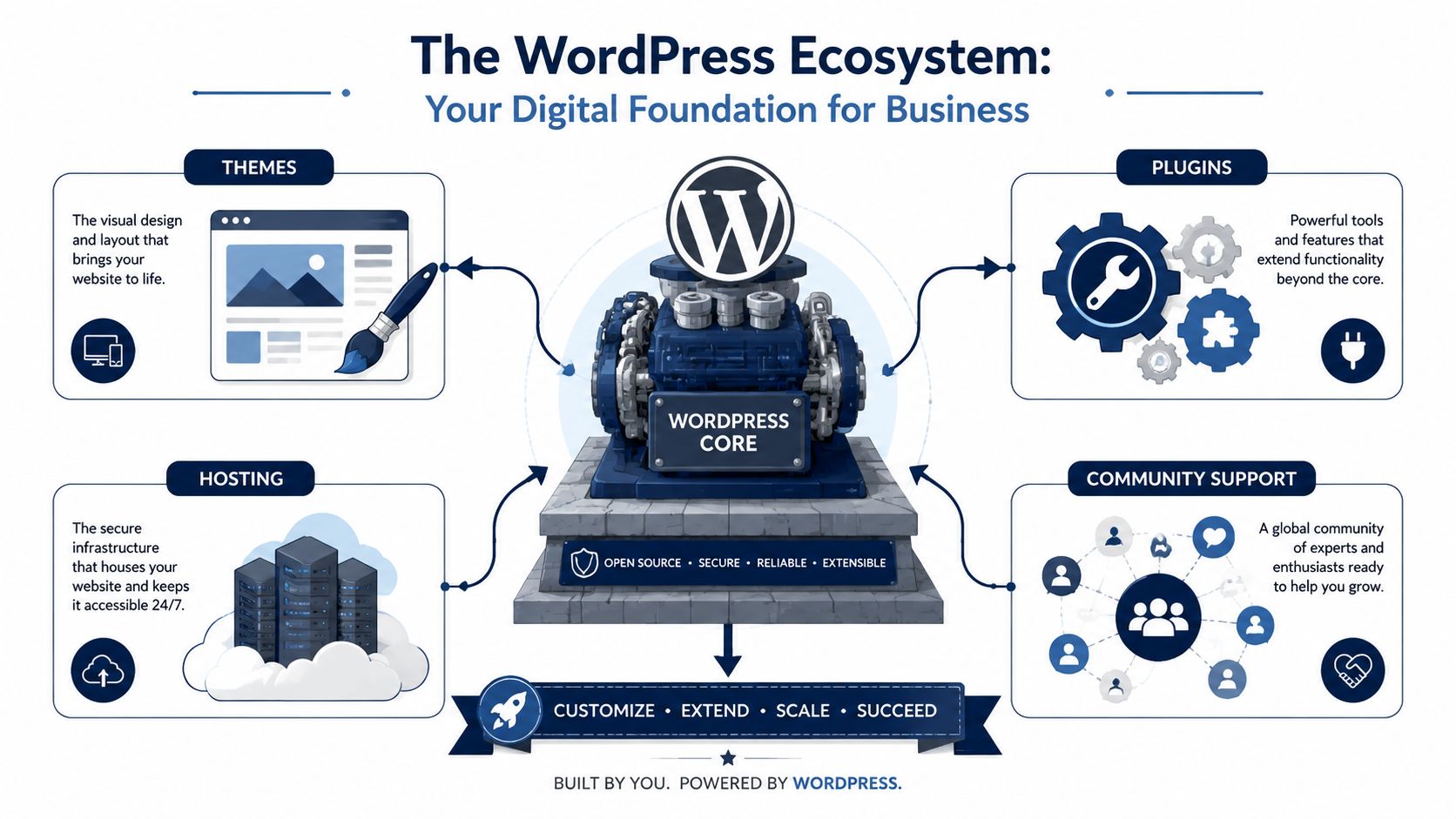
A WordPress site isn't one product. It's a working stack.
WordPress core
This is the engine. It handles content management, page creation, user roles, media, and the basic site framework. On its own, it's functional but plain.
Themes
Your theme controls the visual presentation and a lot of the layout behaviour. Good themes create consistency. Bad themes create clutter, slow performance, and editing headaches.
Plugins
Plugins add capability. Forms, SEO controls, booking systems, security layers, backups, schema support, image optimisation, and ecommerce all usually come from plugins. This is where WordPress becomes powerful. It's also where business owners get into trouble by installing too many.
Hosting
Hosting is the infrastructure your site runs on. Cheap hosting often creates hidden costs later through downtime, slow load times, and support issues. Hosting isn't glamorous, but it shapes the site experience more than most owners realise.
WordPress.org versus WordPress.com
The distinction matters because ownership and flexibility affect long-term cost.
- WordPress.org suits businesses that want control, custom design, integration options, and the ability to scale.
- WordPress.com can suit simpler use cases, but it's often not the best fit once you need custom functionality, advanced plugins, or more tailored SEO control.
WordPress works best when you treat it as infrastructure, not a template toy.
That's the strategic point many guides miss. If your website is meant to generate leads, rank locally, support content growth, and adapt over time, WordPress gives you more room to build a proper digital asset.
For businesses planning a custom build instead of a generic theme setup, this overview of custom WordPress development in Australia explains how a more structured ecosystem approach works.
Key Design Workflows How Your Website Gets Built
There are three common ways a WordPress site gets built. Most problems start when a business chooses the wrong one for its goals.
A local café that only needs a clean menu, contact details, and booking links doesn't need the same workflow as a construction company with multiple services, location pages, quote funnels, and staff logins. The build path should match the business model.
The three options are themes, page builders, and custom development.
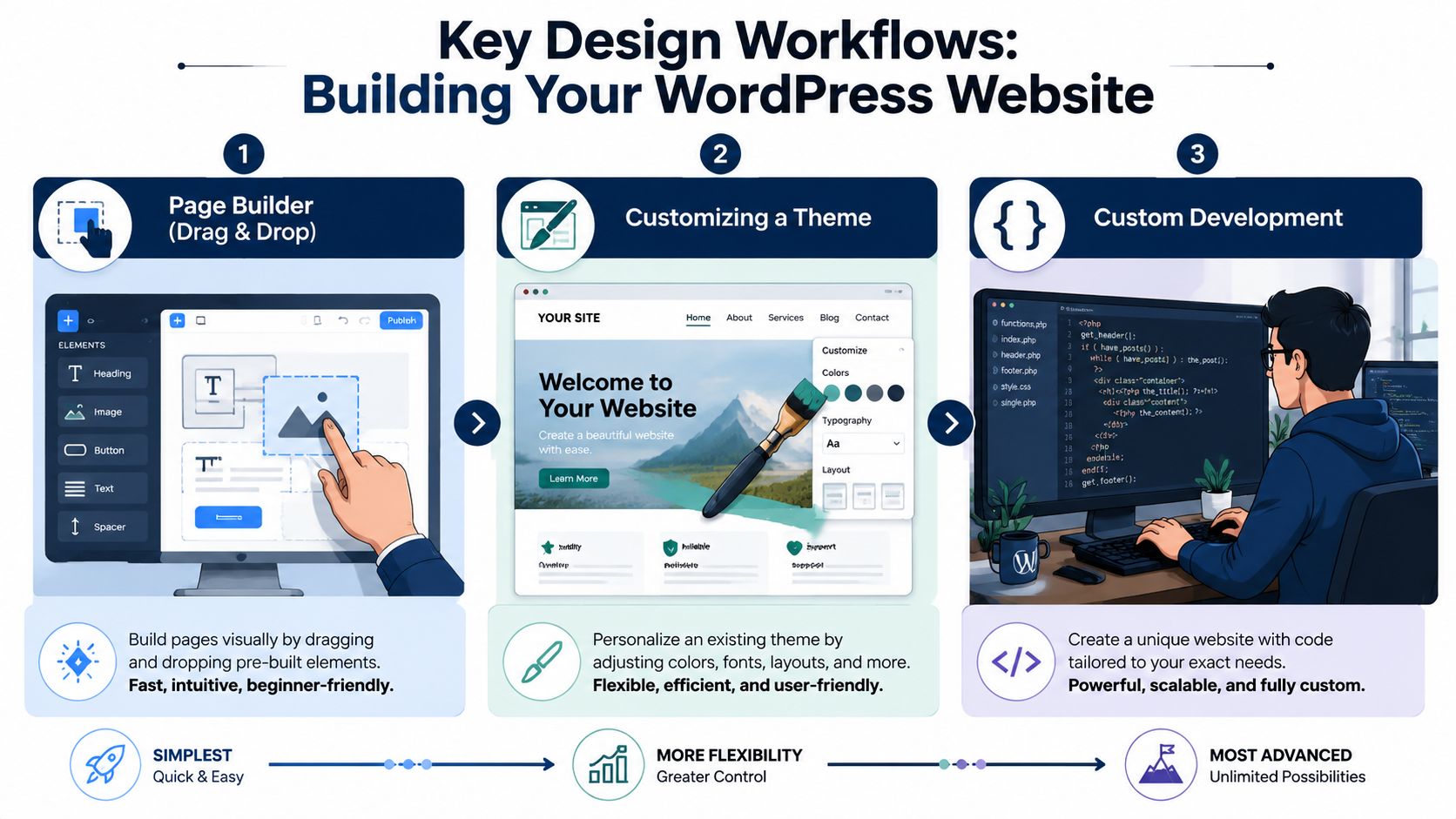
Off the shelf themes
This is the fastest route. You choose a pre-built theme, load in your content, change colours, swap images, and publish.
That can work if your needs are basic and your expectations are realistic. A standard service business with a small number of pages can get online quickly this way. The problem is that many themes look polished in the demo and messy once real business content goes in.
Here's where themes usually help:
- Fast launch when timing matters more than uniqueness
- Lower upfront effort if the site structure is simple
- Predictable feature set if you stick close to the demo layout
Here's where they usually fail:
- Bloated design files from features you don't need
- Brand compromise because you're forcing your business into a pre-made layout
- Harder long-term edits when the theme author built settings in a confusing way
A theme is fine when speed matters and differentiation doesn't. It's a poor choice when the website needs to support a sharp sales process.
Page builders
Page builders sit in the middle. Tools like Elementor, Beaver Builder, or the native block editor can give non-technical owners more control over layout without writing code.
This is why page builders became popular. They make change requests easier. Need to update a homepage section, move testimonials, or create a new landing page? A trained staff member can often do it without waiting for a developer.
That flexibility comes with trade-offs.
Where page builders make sense
They suit businesses that update content regularly and want in-house control. Hospitality businesses often like them because promotions, events, menus, and seasonal offers change often.
They also help when:
- You need landing pages for campaigns.
- Your internal team wants layout control.
- You accept that convenience can create extra front-end weight if the builder is used badly.
Where page builders go wrong
Page builders become a problem when every page is handcrafted with no design discipline. Then spacing changes from page to page, fonts drift, buttons behave differently, and mobile layouts break in odd ways.
A page builder is only as good as the design system behind it.
Without standards, drag-and-drop freedom turns into a maintenance mess.
To see the broader planning steps before any build starts, this website development checklist for Australian business success is a useful reality check.
Later in the workflow, video walk-throughs can help owners understand how structured builds differ from improvised ones:
Custom development
Custom development is the right call when the website does more than present information. If it needs specific functionality, strict performance standards, integration with third-party systems, or a unique lead flow, custom is usually the sensible option.
A custom build gives you cleaner control over:
- User experience, especially on mobile
- Conversion pathways such as quote forms, service flows, and booking actions
- Code quality, which affects speed and maintainability
- Scalability when new sections, campaigns, or integrations get added later
Custom doesn't mean fancy for the sake of it. It means building what the business needs, instead of wrestling a generic tool into shape.
Which option should you choose
A simple rule works well.
Use a theme if the site is small, speed to launch matters, and custom functionality is limited.
Use a page builder if your team wants editing control and you can keep design standards tight.
Use custom development if the website is tied directly to lead generation, brand credibility, organic search growth, or operational workflows.
The mistake isn't choosing the cheapest path. The mistake is choosing a build method that can't support the business six months later.
Optimising for Customers and Search Engines
Plenty of WordPress sites look decent and still underperform. They bury the phone number, load slowly on mobile, confuse Google about what the business does, and give visitors no reason to act.
That's fixable. But it requires discipline.
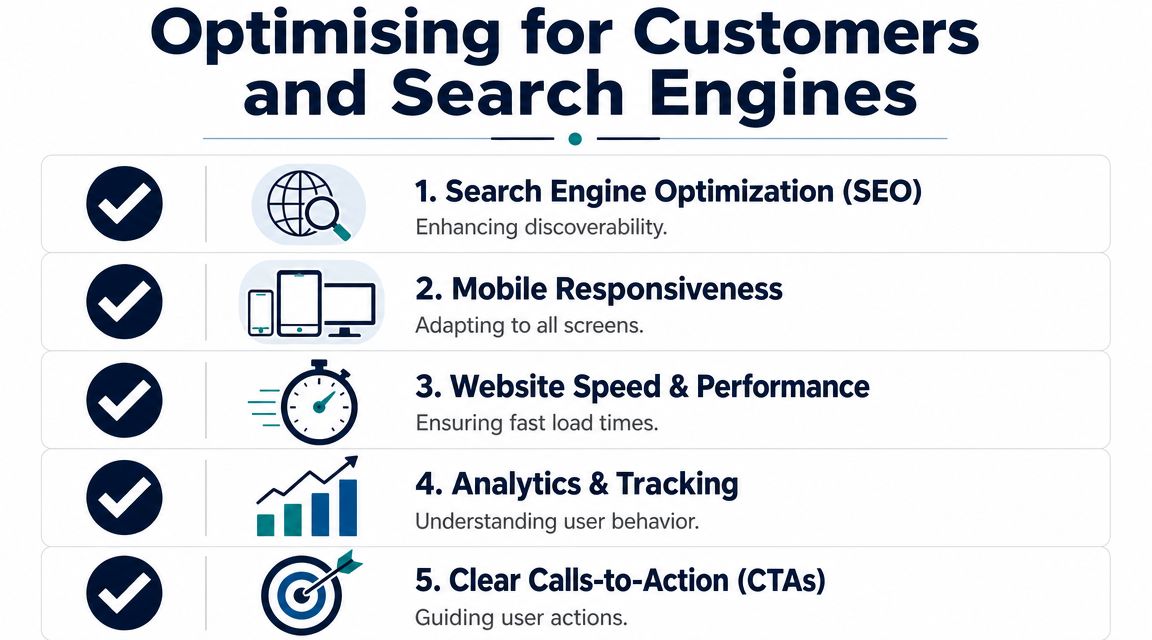
For Australian businesses, mobile-first implementation isn't optional. Industry guidance notes that if the layout, typography, spacing, and navigation aren't explicitly optimised for small screens, you're not designing for the primary channel. It also explains that performance gains come from theme engineering, including clean HTML and CSS, compressed media, and restrained JavaScript, which help reduce render-blocking and improve mobile performance. You can read that in this guide to WordPress website design and mobile-first performance.
Start with mobile, not desktop
Most business owners still review websites on a desktop monitor. Their customers often won't.
If someone needs an emergency plumber, a lunch booking, or a solar quote, they're probably on a phone. That means your site needs thumb-friendly navigation, readable text, fast-loading images, and buttons that don't hide below giant banners.
Focus on these basics first:
- Keep the header lean so the key action stays visible
- Use clear phone and enquiry buttons on service pages
- Compress image files before upload
- Avoid heavy sliders and animation stacks that slow mobile rendering
- Test on real phones over normal mobile connections, not only in desktop previews
SEO that supports local intent
Search engine optimisation for SMBs isn't about gaming algorithms. It's about clarity.
Google needs to understand who you are, where you operate, and what services you offer. Your visitors need the same answers without hunting for them.
What every local business page should do
Each major service page should clearly state the service, the location context, and the action you want the visitor to take. Don't bury your value behind vague copy. “Solutions designed for your needs” says nothing. “Blocked drain repairs across the Gold Coast” does.
A practical SEO setup usually includes:
- Specific page titles tied to service intent
- Unique copy on each core page instead of repeated filler
- Clear location signals in headings and body content
- Internal links between related services and locations
- A strong contact path with forms, click-to-call options, or booking links
For a deeper look at how search visibility and site structure work together, this resource on SEO in web design covers the fundamentals well.
Good SEO starts with saying the obvious clearly. Most small business sites fail because they stay vague.
Preparing for AI search
Many websites are already behind.
If your content is thin, generic, or inconsistent, it's harder for AI-driven search tools to interpret your business accurately. Whether a customer uses Google's AI features, voice search, or an LLM to compare providers, your site needs to present information in a format machines can parse cleanly.
That means:
- Use structured page hierarchies. Clear headings matter.
- Keep service descriptions plain and specific. Don't write fluff.
- Publish useful support content. FAQs, service explanations, process pages, and suburb pages all help if they're useful.
- Use schema tools where appropriate. Especially for local business details, services, reviews, and FAQs.
- Maintain consistency. Business name, contact details, service labels, and location information should match across the site.
Conversion still matters more than traffic
Traffic isn't the goal. Leads are.
A fast page with clear content still fails if the call to action is weak. Every important page should answer the next step quickly. Call now. Request a quote. Book a table. Ask for availability.
Search brings people in. The page has to close the gap between interest and action.
Managing Costs Security and Ongoing Maintenance
Many WordPress conversations turn dishonest. People say WordPress is free, which is technically true, and strategically useless.
The software may be free. Running a professional business website isn't.
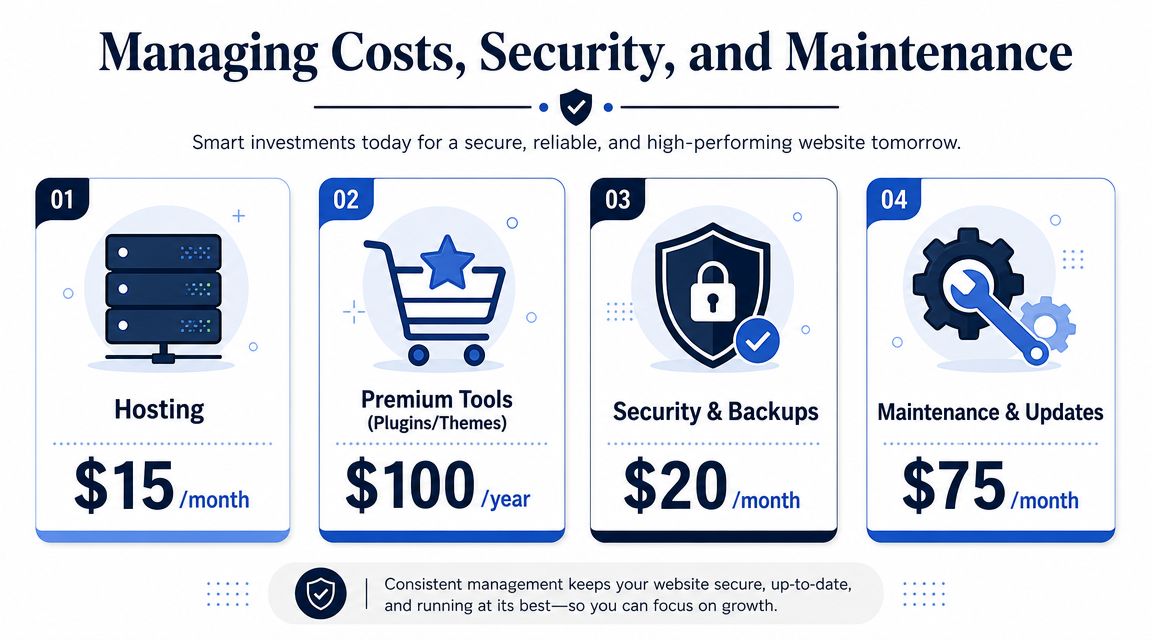
If your site matters to revenue, you need to budget for the things that keep it secure, updated, recoverable, and usable. Ignore that, and the cheap build becomes expensive later.
The costs owners forget
Most SMBs remember domain registration and hosting. They forget the rest.
A realistic WordPress setup often includes:
- Hosting that can support business traffic and backups
- Premium plugins or themes for forms, SEO, booking tools, image optimisation, or design functionality
- Security monitoring to reduce risk from malware, login abuse, and vulnerable plugins
- Backups so one bad update doesn't wipe out the site
- Maintenance time to test updates, fix conflicts, and keep everything current
These aren't optional extras. They're operating costs.
The hidden cost is decision fatigue
The burden isn't just money. It's the constant admin.
A business owner who builds a DIY site often ends up making technical decisions they never wanted. Which plugin is safe? Why did the contact form stop sending? Why did a theme update break the homepage? Why is the site slower now than it was six months ago?
That's why maintenance gets skipped. And skipped maintenance is usually what turns a stable site into a liability.
Business check: If you wouldn't ignore servicing on a work vehicle, don't ignore maintenance on your lead-generating website.
Security is a business issue, not an IT issue
A compromised website damages trust fast. If a visitor sees spam pages, browser warnings, broken forms, or suspicious redirects, they won't stop to be understanding. They'll leave.
That's especially serious for businesses in trades, construction, hospitality, and professional services where reputation matters and leads often come from first impressions.
A sensible setup includes regular update checks, plugin restraint, secure admin access, backups, and someone accountable for monitoring the site. That can be a capable internal team, a freelance developer, or an agency. The point is ownership.
If you need a clearer view of what that ongoing responsibility looks like, this guide to website maintenance as strategic digital asset protection is a useful benchmark.
WordPress Examples for Australian Businesses
The easiest way to judge wordpress for web design is to stop thinking about the platform and start thinking about the job.
A local restaurant
A restaurant site doesn't need complexity. It needs accuracy and speed.
The menu must be easy to update. Opening hours need to be obvious. Booking links should be visible without scrolling through oversized hero images and brand slogans. If the venue has functions, events, or special menus, those should sit in a tidy structure the owner can update without calling a developer every week.
A good WordPress setup for a restaurant usually includes a mobile-friendly menu layout, location details, booking integration, and clean pages for functions or seasonal offers. Done properly, it becomes a practical operations tool, not just a digital brochure.
A tradie website
A plumbing or electrical business needs something different. Trust and urgency matter more than visual flair.
The best tradie sites focus on service clarity. Visitors should immediately see what work you do, where you work, and how to contact you. A quote form should ask sensible questions without becoming a chore. Testimonials, licences, and photo galleries help when they support the buying decision instead of cluttering the page.
The useful part of WordPress here is structure. You can build separate pages for blocked drains, hot water repairs, emergency call-outs, or commercial work, then support those pages with FAQs and suburb targeting. That gives both customers and search engines a much clearer picture of the business.
A hospitality venue
A boutique accommodation operator or tourism venue needs stronger visual presentation, but visuals alone don't sell the booking.
The site should showcase the experience, but it also needs to answer practical questions fast. Rooms or packages, booking paths, nearby attractions, parking, check-in details, and cancellation policies all need clean presentation.
For this kind of business, WordPress works well when the content team needs flexibility. You can publish local guides, seasonal updates, event pages, and package offers without rebuilding the entire site each time. That supports organic visibility and gives guests more reasons to choose you before they even make contact.
The common thread across all three examples is simple. The site has to support the customer journey. Not your preferences. Not the designer's ego. The customer journey.
When to Call an Agency A Strategic Decision
Not every business needs an agency. Some do. The key is knowing the difference early, before you waste time forcing a DIY setup beyond its limits.
If your business only needs a small number of high-intent pages and there's no serious content plan, no scaling requirement, and no complex functionality, WordPress can be more than you need. A source focused on WordPress design considerations makes that point clearly. It notes that WordPress can be overkill when a site's main job is a small set of conversion pages, unless the business needs ongoing SEO content, landing pages, or scalable templates. It also raises a significant issue many owners ignore, which is the total effort involved in updates, security, plugin management, and content production for an Australian business with only a handful of pages. You can read that perspective in these WordPress design considerations for small business websites.
DIY is fine when the brief is genuinely small
A DIY route can work if all of these are true:
- The site is simple, with limited pages and no advanced functionality
- You're comfortable learning the platform, including plugin and update basics
- Brand polish isn't mission-critical at this stage
- You have time to manage content, fixes, and maintenance properly
That last point matters most. DIY isn't free. It's paid for with owner time.
Call an agency when the website affects growth
If the site is tied directly to lead generation, local SEO, booking flow, or business credibility, agency support usually becomes the smarter commercial decision.
That's especially true when you need:
- A proper conversion strategy, not just pages that look nice
- Clean performance on mobile, where most local buyers make quick decisions
- Structured content and SEO planning
- Integration with bookings, CRMs, forms, or business systems
- Ongoing accountability for maintenance and improvements
One structured option can be the right fit. Titan Blue Australia provides website design, development, SEO, and AI search support for Australian businesses, which is relevant when a business wants both the site build and the discovery strategy handled in one place.
If your website is supposed to help generate revenue, treating it like a weekend project is usually a false economy.
The true cost of a weak DIY build isn't just a clunky homepage. It's missed leads, lower trust, slower growth, and months spent patching avoidable problems.
Frequently Asked Questions About WordPress Web Design
Is WordPress still relevant with AI search growing?
Yes, if the site is built properly. AI search still relies on clear, structured, trustworthy source content. WordPress remains useful because it gives businesses control over pages, headings, service content, metadata, FAQs, and schema tools. The platform isn't the advantage on its own. The advantage is what you publish and how cleanly you structure it.
Is WordPress good for ecommerce?
It can be, especially for SMBs that need flexibility and content control alongside product sales. But ecommerce raises the stakes on speed, maintenance, plugin choices, and checkout flow. If online sales are central to the business, don't improvise the build.
Can I manage a WordPress site myself?
Yes, if the site is simple and you're prepared to handle updates, plugin decisions, page edits, and basic troubleshooting. Many owners can manage routine content updates once the site is set up properly. Fewer enjoy handling the maintenance side for long.
How often should a WordPress site be updated?
Regularly. Core updates, plugin updates, content refreshes, and security checks should be part of normal business operations. Waiting until something breaks is the wrong model.
Is a custom WordPress build worth it?
It is when the site supports lead generation, local search visibility, operational workflows, or brand credibility in a competitive market. If the website plays a real role in growth, custom work often saves time and rework later.
If you want a WordPress site that's built for leads, search visibility, and long-term maintainability, talk to Titan Blue Australia. We work with Australian businesses that need more than a template. They need a website that helps the business grow.
Make Titan Blue a preferred source in Google
One click tells Google to surface our articles more often in Top Stories, AI Overviews and AI Mode.

Best Dental Website Design Agencies in Australia: 7 Compared
Best dental website design agencies in Australia 2026: seven compared on dental proof, booking, AHPRA…

Childcare Centre Website Design Australia: The 2026 Guide
Childcare centre website design Australia: show hours, ages and enrolment as text so parents and…

Electrician Website Design Australia: The 2026 Guide
Electrician website design Australia: what to build, what we found on eight Gold Coast electrician…