Stay ahead with the latest tips, trends, and insights from the Titan Blue team , straight from the studio in Broadbeach.



You're probably in the same spot a lot of Australian business owners hit. You know you need a proper website, you want an email address that looks credible, and you've started comparing offers to buy domain hosting, only to find bundles, add-ons, upsells, and jargon that make a simple decision feel harder than it should.
For a café, plumber, builder, medical clinic, restaurant, electrician, or local service business, this decision isn't just about getting a website online. It affects whether customers can find you, whether your email keeps working, and whether changing providers later turns into a mess. The businesses that get this right early usually save themselves rework, avoid lock-in, and keep control of a valuable asset from day one.
Your First Step to Getting Your Business Online
A domain is your web address. Hosting is the server space where your website files live. You need both, but they do different jobs, and that distinction matters more than most first-time buyers realise.
In Australia, this matters because the audience is already online and mobile. By June 2024, Australia had about 23.7 million internet subscribers and 36.2 million active mobile services, according to this web hosting statistics summary. That's why domain registration and hosting aren't fringe technical purchases. They're basic business infrastructure for local discovery.
If your business depends on bookings, quote requests, phone calls, menu views, project galleries, or service-area searches, your online setup needs to work cleanly from the start.
What you're actually buying
Most new owners assume they're buying “a website package”. In practice, you're making three separate decisions:
-
Your domain name
This is the address customers type or click. -
Your hosting account
This is the environment that loads the site. -
Your website platform
This might be WordPress or another builder installed after the first two pieces are in place.
That order helps. It stops you from choosing a flashy website tool first and then discovering the domain is hard to move, the renewal terms are poor, or the support isn't suited to an Australian business that needs fast answers.
Practical rule: Buy the asset first, then choose the platform. Your domain is the asset.
A simple first pass usually works best:
- Secure the domain name early: If the name fits your brand and is available, don't overthink it for weeks.
- Choose hosting based on fit, not hype: A small brochure site, booking site, or starter e-commerce build doesn't need the most advanced plan on the market.
- Keep records organised: Store registrar logins, renewal dates, billing contacts, and DNS access in one safe place.
Before you purchase anything, run through a proper website planning checklist for Australian businesses. It will save you from buying the wrong setup for the kind of site you need.
Choosing Your Domain Name and Hosting Type
The best buying decisions are usually boring. Clear name. Sensible hosting. No unnecessary extras.

Picking the right domain name
For most Australian SMBs, the strongest option is usually the one that is easy to say, easy to spell, and clearly tied to the business name. If you serve Australian customers, a .com.au often signals local relevance and credibility.
Keep it simple. If someone hears your domain once on the phone, they should be able to type it without asking for clarification three times.
A good business domain usually has these qualities:
- Brand-led: Match your trading name where possible.
- Short enough to remember: Not necessarily tiny, just not clumsy.
- Easy to spell aloud: Avoid awkward abbreviations, double letters, and forced hyphens.
- Built for longevity: Choose a name that still fits if you expand services or locations later.
For .au domains, your registrant details need to be accurate and eligible. That's not admin trivia. It affects ownership, renewals, and future transfers.
Treat the domain registration like a lease document or vehicle registration. If the wrong person owns it, fixing that later can be painful.
Choosing a hosting type that fits
Hosting gets overcomplicated fast. The plain-English version is this:
- Shared hosting is like renting a unit in a larger building.
- Higher-tier hosting gives you more dedicated resources and more control.
- Cloud-oriented setups usually make more sense once the site is critical to operations, leads, or transactions.
For a new business site, shared hosting is still the common starting point. Industry reporting for 2025 to 2026 says shared hosting remains the largest entry-level segment at about 37.5% to 37.64% of the global web hosting market, as outlined in this hosting market share summary.
That matters because it reflects how most businesses enter the market. They start with a low-cost, entry-level plan and upgrade when the site becomes more demanding.
When shared hosting is fine, and when it isn't
Shared hosting is usually fine if your site is:
- a basic services website
- a local brochure site
- a simple booking or enquiry site
- an early-stage business website built on WordPress
It starts to feel tight when you add heavier plugins, larger image libraries, more frequent traffic spikes, or a more complex e-commerce setup.
Signs you may need a stronger platform later include slower page loads in the admin area, plugin conflicts during updates, email issues tied to the same account, and hosts that limit flexibility once your website starts doing real work.
If WordPress is part of the plan, this guide to WordPress for web design in Australia is worth reading before you buy. The right hosting decision becomes easier when you know what the website platform will demand over time.
The Purchase Process Demystified
The checkout flow is where many SMBs overspend. Not because the base product is wrong, but because the extras are framed as urgent, mandatory, or “recommended for protection”.
Most purchase paths follow the same pattern. You choose a domain, select a hosting term, then get offered add-ons before payment. If you understand which items are core and which ones are optional, the process becomes a lot easier.
What usually belongs in the basket
You typically need these items:
- The domain registration for your business name
- A hosting plan suited to the type of site you're launching
- Basic DNS access so the domain can point where it needs to point
- Admin access that stays with the business, not with a former staff member or freelancer
That's the foundation. Everything else needs scrutiny.
Add-ons that deserve a second look
Not every upsell is bad. Some are useful. The problem is buying them before you know whether they're already included or whether you need them at all.
Common examples:
- SSL certificates: Essential for a secure site, but often already included with hosting.
- Email hosting: Useful if you want addresses like hello@yourbusiness.com.au, but don't buy it blindly without checking limits, deliverability, and support.
- Website builder tools: Fine for some businesses, restrictive for others.
- Backup products: Valuable, but check whether the host already provides backup options.
- Security add-ons: Sometimes worthwhile, sometimes just repackaged features.
A good rule is simple. If the checkout can't explain what the extra does in plain business terms, don't add it on impulse.
Convenience at checkout often creates complexity later.
Bundled versus separate
This is one of the most important decisions in the whole process.
Buying the domain and hosting together feels tidy. One invoice. One login. One support team. For a lot of owners, that sounds ideal.
Sometimes it is. But it also creates concentration risk.
If the same provider controls your billing, domain, website hosting, and sometimes email, one account issue can affect all of them at once. That might be manageable for a hobby site. It's a real problem for a business that relies on enquiries, bookings, or service requests.
A more resilient setup is often:
- Register the domain with a registrar account the business controls.
- Purchase hosting separately.
- Connect them through DNS.
- Keep clear records of who owns what.
That gives you more freedom if you need to rebuild the site, change hosts, or bring in a different developer later. It's not harder in any meaningful way once the structure is in place.
Connecting Your Domain to Your Hosting Account
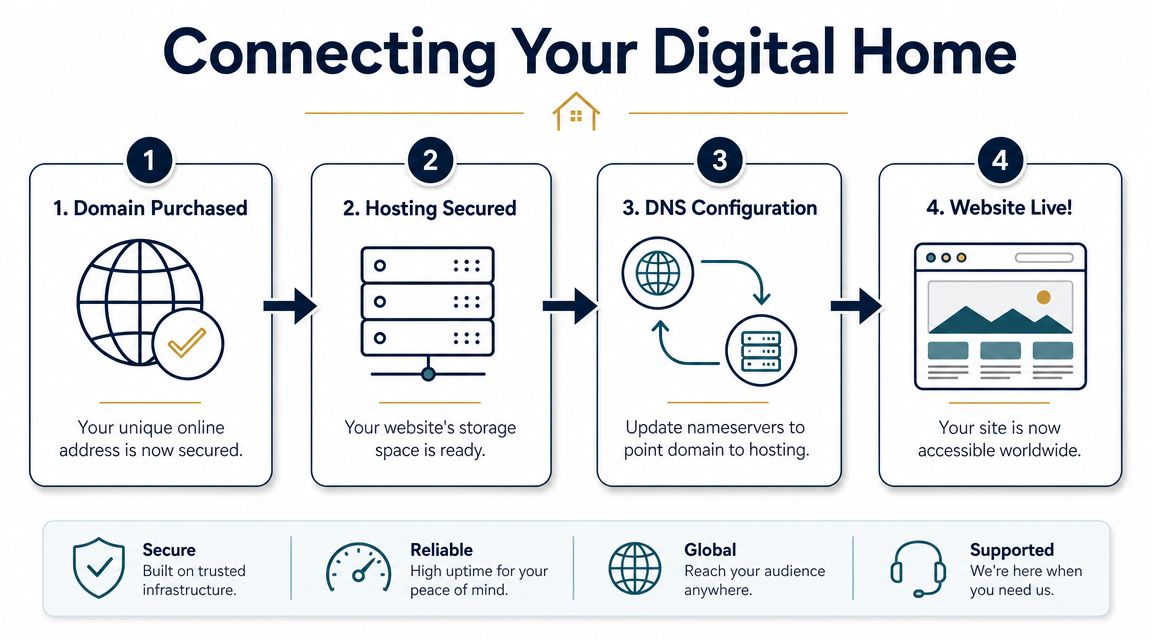
Once you've bought both pieces, the next job is linking them. This is the part that sounds technical and usually isn't.
Think of nameservers as the direction sign for your domain. They tell the internet where the website and related services should be found. If your domain is the street address, the nameservers are the notice that tells everyone which building now handles the mail.
The basic connection flow
In most cases, the process looks like this:
-
Log in to your hosting account
Find the nameserver details or DNS instructions supplied by the host. -
Log in to your domain registrar
This is the company where the domain is registered. -
Update the nameserver settings
Replace the current values with the hosting provider's values. -
Save the change and wait
The update needs time to spread across networks and devices.
That's the conceptual workflow. The exact menu names vary, but the logic is consistent.
What to check before you switch
Business owners can create avoidable problems. The website may be ready, but if the mail records or other DNS settings aren't carried over properly, email can break during the cutover.
Before making the switch, review:
- A records: These help direct the domain to the website location.
- MX records: These affect business email routing.
- SPF and DKIM records: These support email authentication and deliverability.
- Any subdomains in use: Such as booking, shop, or portal addresses.
According to this explanation referencing auDA guidance, .au domain changes are often reflected quickly but may take up to 48 hours globally because of resolver caching. The same guidance notes that teams should avoid launching time-sensitive campaigns immediately after the switch and should verify A, MX, and SPF/DKIM records before cutover.
That advice is practical, not theoretical. Don't switch DNS an hour before a promotion, email campaign, or booking launch.
If your site or email matters on Monday morning, don't make DNS changes late Sunday night without a rollback plan.
A broader project like this usually sits inside a bigger build process. If you're trying to understand where hosting, DNS, staging, launch checks, and post-launch support fit together, this guide to web design and development projects lays out the bigger picture clearly.
What “propagation” actually means
Propagation just means not every provider, browser, device, or network updates at the same moment. One person may see the new site quickly. Another may still see the old location for a while.
That's normal.
The mistake is assuming something is broken because different people report different results during the change window. Usually, it's just the update moving through the system as expected.
Avoiding Common Australian Pricing and Renewal Traps
The cheapest offer on the screen is often the most expensive decision over the next few years.
Australian SMBs don't just need a low entry price. They need predictable ownership, stable support, and a setup that won't become a headache at renewal time or during a migration.
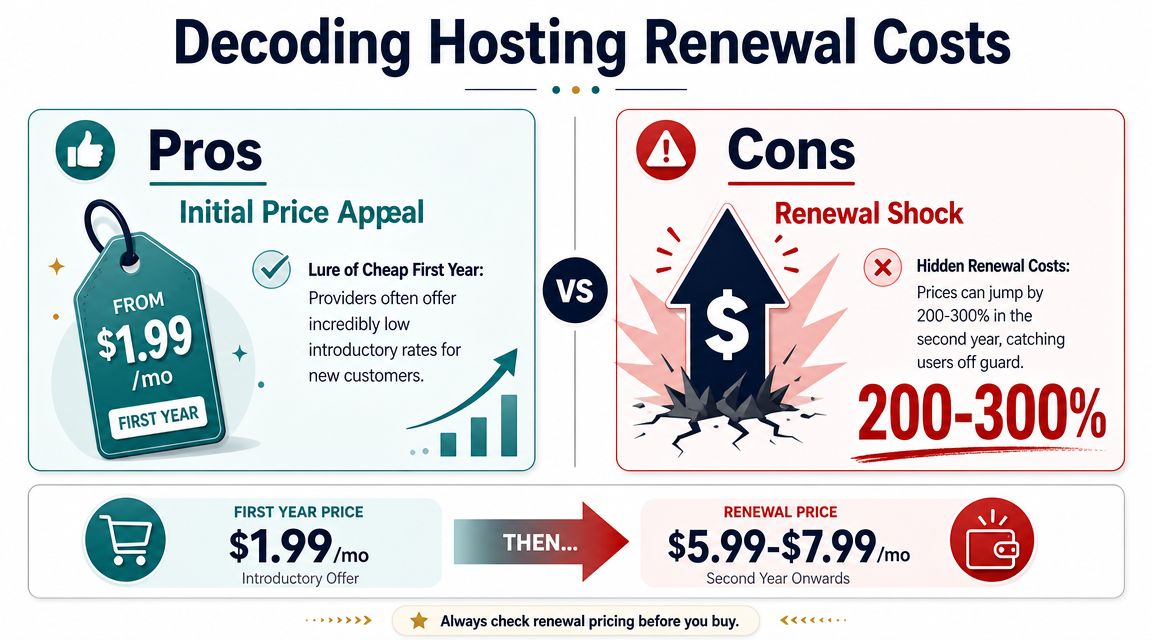
A lot of providers advertise an attractive first term, then rely on poor checking habits at renewal. The issue isn't that introductory pricing exists. The issue is that many buyers never compare the full ownership picture before committing.
What to review before you pay
Look past the front-page headline and ask better questions.
- What happens at renewal: Introductory pricing can hide a much less attractive ongoing cost.
- How billing is handled: Auto-renew can be helpful, but only if the right card, right contact, and right approvals are in place.
- Whether GST is clear: Australian buyers should confirm the actual checkout cost, not just the sticker price.
- How support works: If something breaks, can you reach someone at a useful time and get a practical answer?
Current commentary on Australian buyers consistently points to the same blind spot. Too many businesses focus on the first-year offer instead of the longer-term cost, support quality, and portability. That's one reason a fuller pricing review matters when you're budgeting a site build, redesign, or migration. This broader Australian website cost guide helps frame those decisions properly.
To see the pricing issue from another angle, this short video is worth a look before signing up:
The bigger risk isn't price
The most costly mistake is often structural, not financial.
For Australian SMEs, one of the most overlooked operational risks is putting the domain and hosting under the control of the same vendor account without thinking through the downside. As explained in this discussion of domain ownership without hosting, if the same vendor controls both and there's a payment issue, account lockout, or migration problem, the website and email can go offline together. That matters even more because the ACSC reports small business cyber incidents remain common.
That's the practical reason many experienced operators prefer separation. It reduces the blast radius when something goes wrong.
A safer long-term view
For a local business, the domain isn't just part of a package. It's a business asset connected to branding, email, rankings, and customer trust.
A sensible approach often looks like this:
- Keep the domain under direct business control: Ideally in an account owned by the business, not a staff member.
- Use hosting as a replaceable service: If the host underperforms, you can move.
- Document access clearly: Billing, registrar login, hosting login, and recovery contacts should all be current.
- Review renewals ahead of time: Don't leave critical services to silent auto-renew without oversight.
That setup isn't fancy. It's disciplined. And disciplined setups usually survive staff changes, rebuilds, and supplier changes far better than bundled shortcuts.
Your Post-Setup Checklist and When to Call the Pros
Once the domain and hosting are connected, the work shifts from ownership to readiness. At this stage, a lot of businesses lose momentum. They've bought the parts, but the website still isn't properly launch-ready.
Your immediate checklist
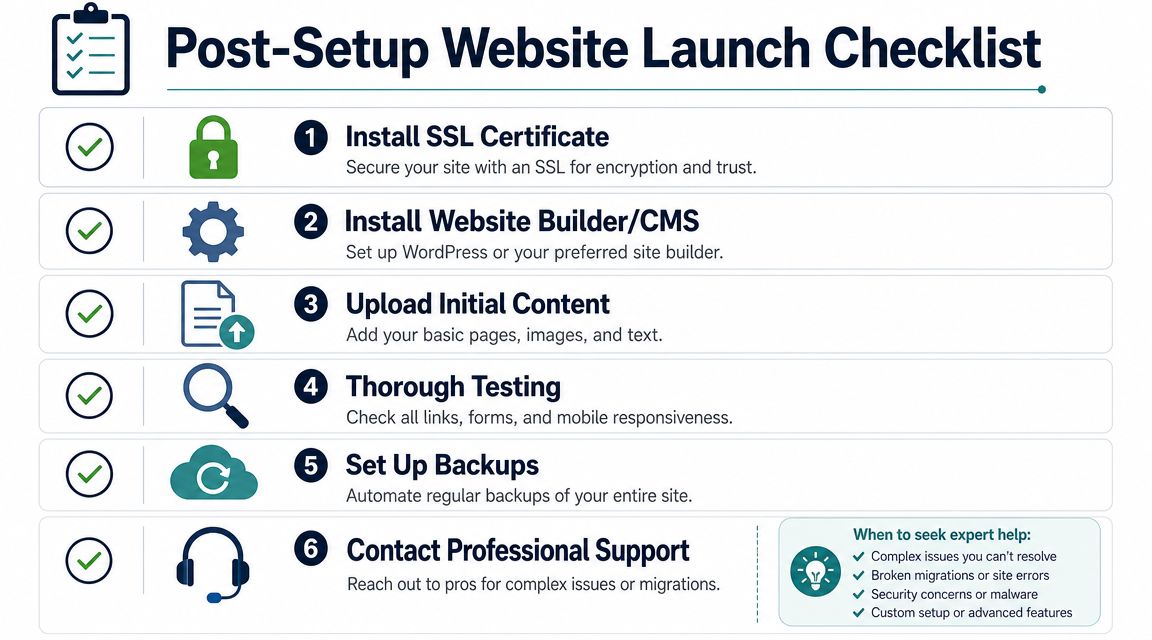
Use a short, practical checklist and work through it properly.
- Install the SSL certificate: This enables the secure padlock experience and is standard for trust and basic security.
- Set up the website platform: For many SMBs, that means WordPress or another managed CMS.
- Create your core pages: Home, services, about, contact, privacy, and any booking or quote pages.
- Test forms and mobile display: Don't assume they work because they look fine on desktop.
- Set up backups: A website without a reliable backup process is exposed.
- Configure professional email carefully: Make sure your domain-based email is sending and receiving as expected.
A key technical point is that domain registration only places the name into the global registry, while website hosting is the server environment that answers requests. Separating them improves portability and reduces lock-in if you change platforms later, as outlined in this domain purchasing guide. For Australian businesses using .au domains, accurate registrant eligibility and contact details are especially important.
The launch isn't the finish line. It's the point where maintenance, updates, backups, and performance start to matter.
When it's smarter to get help
DIY is fine for straightforward setups. It stops making sense when the website needs to do more than exist.
Bring in experienced support when:
- you're migrating from an old host and can't risk downtime
- email is tied to the same domain and must stay stable
- the site needs SEO-ready structure from day one
- speed, lead generation, and conversion matter
- multiple providers, plugins, or third-party systems are involved
Once the site is live, it also needs ongoing care. This website maintenance guide for protecting your digital asset is a useful next step if you want to avoid the common “set and forget” mistake.
If you want expert help setting up your domain, hosting, website, SEO, and long-term digital strategy properly, Titan Blue Australia can help. With more than 25 years in the industry, the team works with Australian SMBs that need more than a basic website. They need a digital presence that loads well, ranks well, converts well, and stays under the business's control.

Buy Domain Hosting: 2026 Guide for Australian SMBs
You're probably here because you've hit that familiar point. You need a website, someone's told…

AEO Content Optimisation: How to Write Content That AI Actually Cites
A comprehensive guide to AEO content optimisation — the specific techniques, formats, and strategies that…

Digital marketing checklist for cafes in 2026
Boost your café’s success with our essential digital marketing checklist for cafes. Learn practical strategies…