


Last updated:
You're probably here because you've hit that familiar point. You need a website, someone's told you to buy a domain and hosting, and suddenly you're staring at a checkout page full of add-ons, jargon, and “limited-time” bundles that don't tell you what actually matters.
For most Australian small businesses, this isn't a tech purchase. It's a business asset decision. The name you register becomes part of your brand. The hosting you choose affects whether customers can reach your site, send emails, and trust that your business is established. If you get the basics right early, life gets easier later. If you get them wrong, changing course often costs time, money, and momentum.
Your First Step in the Digital Economy
A plumber in Brisbane, a café in Broadbeach, a builder on the Gold Coast, or a regional hospitality venue all face the same reality. Customers expect to find you online before they call, book, or visit.
That expectation isn't anecdotal. In Australia, 65% of businesses had a web presence in 2022–23, according to the Australian Bureau of Statistics, cited in Bluehost's Australian web presence summary. That tells you something important. A website is no longer a “nice to have” signal of growth. It's part of basic credibility.
Buying domain hosting sits right at the start of that process. Your domain is the name customers type, click, save, and remember. Hosting is the service that keeps the site available when someone searches for you at 7 pm on a Tuesday or tries to book on a Sunday morning. If either piece is weak, the business feels less reliable than it actually is.
A lot of owners treat this job like paperwork. Pick a name, click through, move on. That's usually where problems start. Cheap bundles can be fine for a basic launch, but they often hide poor control, awkward renewal terms, or a setup that's hard to move later.
If you're still getting your head around what “digital presence” means in practical business terms, this guide to digital presence for Australian businesses is worth reading alongside this one.
Cost matters too, especially when you're starting out. If you're comparing business subscriptions more broadly, not just web services, it can help to learn group purchasing with AccountShare, because the bigger lesson is the same. Buy with a long-term view, not just on the cheapest first screen.
Practical rule: Treat your domain like your business name and your hosting like your premises. You can change the fit-out later. You don't want to lose control of the address.
Choosing Your Digital Address a Domain Name
The best domain names are usually boring in the right way. Easy to say, easy to spell, and hard to confuse with someone else.
That matters more than clever branding. If a customer hears your business name once and can't type it correctly later, the domain is working against you. Local businesses feel this quickly. Trades, restaurants, and service businesses get a lot of word-of-mouth traffic. If the domain doesn't match what people remember, they'll often drift to a directory, a map listing, or a competitor.
Why .au matters for Australian businesses
The .au namespace dates back to 1986, and the launch of direct .au in 2022 led to rapid uptake. By 2024, the namespace had surpassed 4 million registrations, as noted in Hostinger's summary of Australian domain growth. For an Australian business owner, the takeaway is simple. Local customers already recognise .au as familiar territory.
That doesn't mean every business must use a direct .au and ignore everything else. It means a .au option deserves serious consideration if you serve an Australian market and want your web address to feel local from the first glance.
What usually works
A good domain tends to follow a few practical rules:
- Keep it close to the trading name: If your business is called Coastal Edge Plumbing, a domain that closely matches that name is usually stronger than a slogan or abstract phrase.
- Choose clarity over creativity: Hyphens, unusual spellings, and doubled letters create errors. People won't remember whether it was “coastaledge”, “coastal-edge”, or “coastaledgegroup”.
- Think beyond today: Don't box yourself into a suburb if you plan to expand. A very narrow location-based domain can become awkward later.
- Say it out loud: If you can't spell it easily over the phone, expect leads to get lost.
One of the most useful planning exercises is to shortlist a few domain options before you touch a registrar checkout. This website planning checklist helps tighten that thinking before money gets spent.
What to check before you buy
Before you register anything, check the business basics around the name:
- Brand fit: Does it match the name on your signage, vehicles, invoices, and social profiles?
- Trademark risk: A domain being available doesn't mean it's safe to use commercially.
- Handle consistency: If Instagram, Facebook, and other key handles are wildly different, your branding gets messy fast.
- Future use: Will this still make sense if you add services, locations, or a second team?
Your domain isn't just a technical setting. Customers use it as a shortcut to decide whether your business looks established.
Direct .au or .com.au
For many SMBs, this comes down to branding style and availability. A direct .au is shorter and cleaner. A .com.au still feels familiar and established to many buyers.
The wrong move is overthinking the extension while ignoring the underlying name. A strong, readable domain with a clear connection to the business will outperform a clever but forgettable one. Pick the version that suits your brand, secure the one you'll use, and keep control of it properly from day one.
Finding Your Digital Land and Why Separation Matters
If the domain is your street address, hosting is the land and building behind it. Customers use the address to find you. Hosting is what they arrive at.
A lot of owners blur those together because many providers sell them in one basket. That's convenient at first, but convenience and control aren't the same thing.
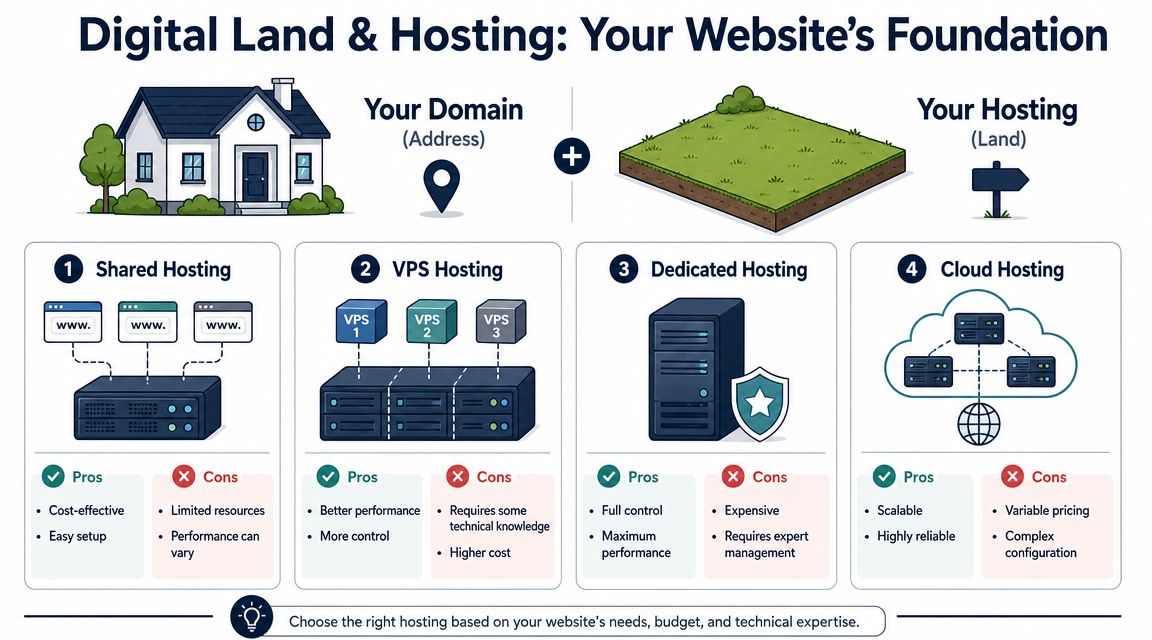
The main hosting types in plain English
If you're trying to buy domain hosting without drowning in jargon, think about hosting this way.
Shared hosting
This is the entry-level option. Your website sits on a server with many other websites. It's often fine for a simple brochure site, a new business site, or a basic service website without heavy traffic or custom functionality.
The upside is straightforward. Lower cost and easier setup.
The downside is just as straightforward. If the environment is crowded or poorly managed, performance can vary.
VPS hosting
A VPS gives you a more defined slice of server resources. It usually suits growing businesses, websites with more traffic, and sites that need more stability or flexibility than basic shared plans can offer.
It's often the middle ground that makes sense for established SMBs. More control, better performance, and fewer neighbour-related issues than shared hosting.
Dedicated hosting
This is a full server for one client. Most small businesses don't need it at the start.
It can make sense for heavy workloads or specialised environments, but it brings more cost and more technical responsibility. If you don't know why you need dedicated hosting, you probably don't need it yet.
Cloud hosting
Cloud hosting spreads the workload across broader infrastructure. It's often a good fit when flexibility, reliability, and growth matter more than the cheapest setup.
The trade-off is complexity. It can be excellent, but only if the setup and support are handled properly.
Why I prefer separating the registrar and host
This is the part most first-time buyers aren't told. You do not have to keep your domain registration and hosting with the same company. In many cases, you shouldn't.
A useful resilience strategy is to separate the two. The broader Australian market already works across multiple infrastructure providers, and that split reduces risk because a hosting issue, pricing dispute, or outage doesn't also threaten control of your domain, as discussed in this industry discussion on separation of risk and multi-provider setups.
That matters in the world.
If your website host gives poor support, you can move the site. If the same company also controls your domain and things turn messy, a routine migration can turn into an administrative headache at exactly the wrong time. For a trade business relying on quote requests or a restaurant taking bookings, that's not a small inconvenience.
Keep the asset and the premises separate. It's the simplest way to avoid one vendor having too much leverage over your business.
What to look for before committing
When you're comparing providers, focus less on marketing labels and more on operational control.
- Registrar quality: You want full DNS management, clear account ownership, and a transfer process that isn't hostile.
- Hosting fit: Match the hosting to the current site, not the dream version of the site three years from now.
- Support reality: Test whether support answers practical questions clearly before you buy.
- Exit flexibility: Assume you may move hosts one day. Buy accordingly.
There's a bigger maintenance angle here too. Once a site is live, someone needs to keep it stable, updated, and recoverable. This strategic guide to website maintenance is useful if you want to think beyond launch day.
Connecting Your Domain and Hosting
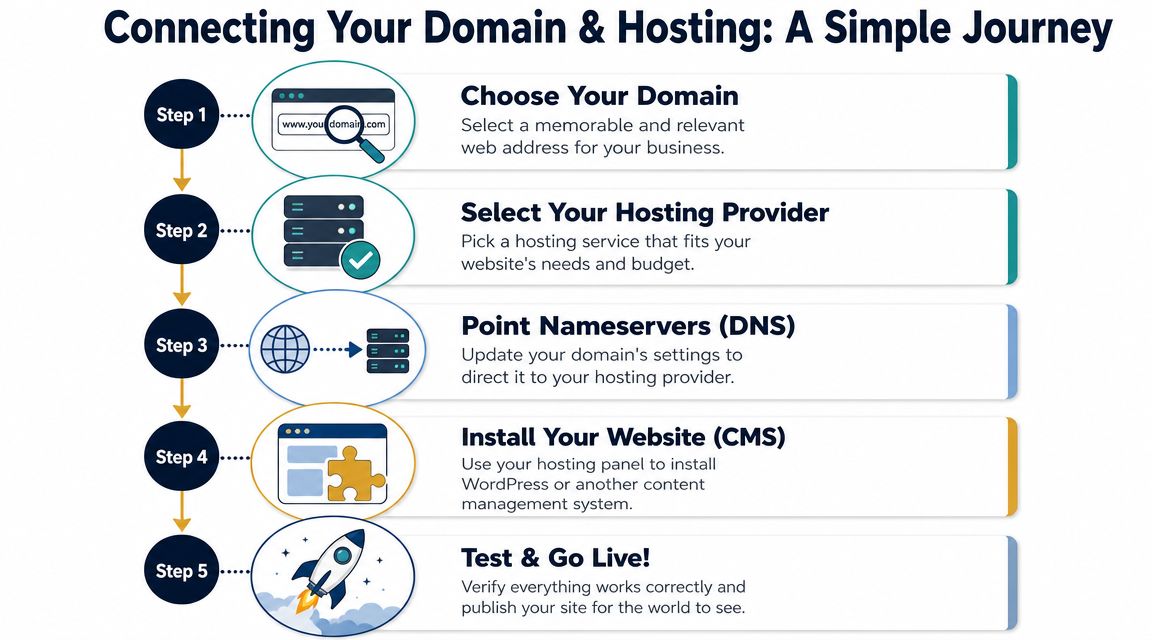
This is the step that makes people think they've made a mistake, because they buy the domain, buy the hosting, and then expect the website to appear automatically.
It won't.
A common pitfall is assuming the domain and hosting are already connected after purchase. The standard process is to buy both, point the domain to the host's nameservers, then verify the setup by testing the website and a test email, as outlined in Network Solutions' domain-to-hosting workflow.
What nameservers actually do
Nameservers tell the internet where to look for the services attached to your domain. In plain language, they act like the routing layer between the name you bought and the hosting service you want that name to use.
The important practical point is this. You usually update that setting at the domain registrar, not inside the website itself.
If you've separated registrar and host, this part becomes easier to understand because each provider has a clear role. The registrar controls the domain. The host provides the website environment. You connect the two by changing the right settings in the right place.
Why nothing seems to happen straight away
After you change nameservers or DNS settings, the internet needs time to catch up. Different networks and devices can see the change at different times. That's why one person can load the website while another still sees the old result or an error page.
That delay is normal. What matters is verifying the setup properly once the change has had time to settle.
A simple test goes a long way:
- Open the website in a browser: Check that the expected site loads on your domain.
- Send a test email: If you're using business email on the domain, confirm it sends and receives correctly.
- Check the obvious pages: Home, contact page, booking or enquiry forms.
- Look from a second device: It helps rule out browser cache confusion.
DNS issues often show up in email first. A site might appear fine while mail quietly fails in the background.
For a broader launch perspective, this website development checklist for Australian businesses helps tie the technical connection work back to the bigger project.
A visual walkthrough can also help if this still feels abstract:
Where beginners usually go wrong
Most setup problems aren't advanced. They're basic mismatches.
Sometimes the domain points to the host, but the email hasn't been configured properly. Sometimes the website is installed on the host, but the domain still isn't looking there. Sometimes everything is technically in place, but nobody tested forms, contact details, or inbox delivery.
The fix is rarely “be more technical”. The fix is to be methodical. Connect the domain. Wait. Test the site. Test the email. Confirm the critical business functions before announcing the launch.
Securing Your Site with SSL Email and Other Essentials
A site being live doesn't mean it's ready. Plenty of businesses stop at “the homepage loads” and leave the important work half done.
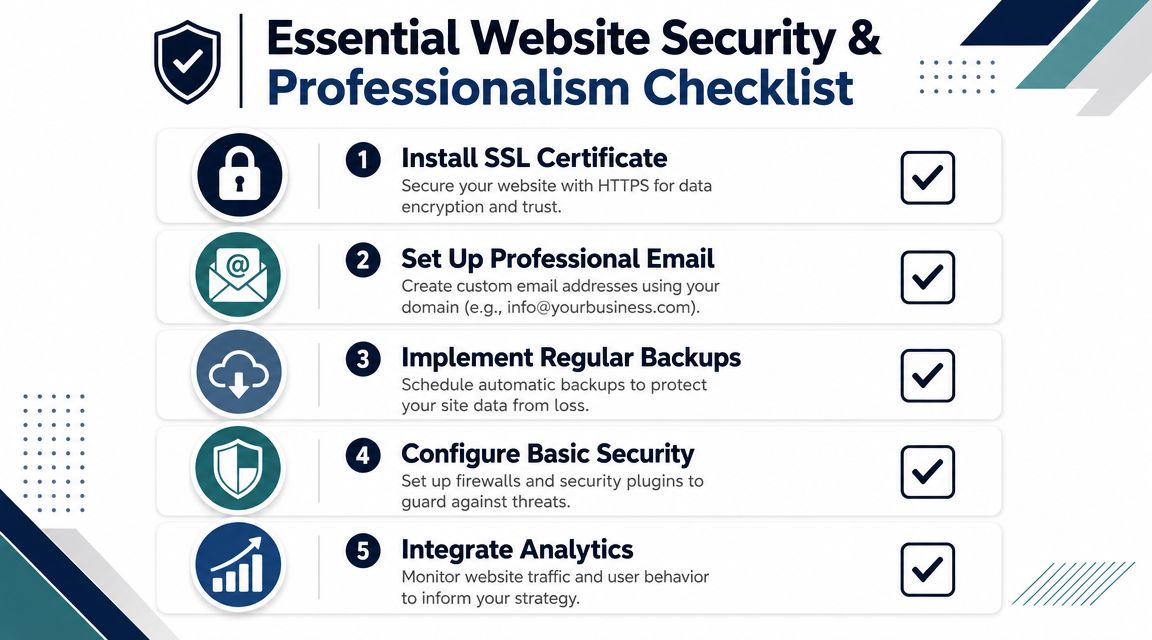
The next jobs are the ones that protect trust. Secure the domain account. Secure the hosting account. Turn on SSL. Set up proper email. Make sure the business can communicate and recover if something goes wrong.
Start with account security
The Australian Cyber Security Centre recommends practical post-registration controls including registrar locks, multi-factor authentication, and making sure your provider supports full DNS management, as referenced in this summary of domain security controls.
That advice is useful because it focuses on the account layer, not just the website.
If someone gets into your registrar account, they may not need to hack the website itself. They can interfere with where the domain points, disrupt email, or create confusion around renewals and ownership. That's why the registrar matters so much.
A good baseline includes:
- Enable multi-factor authentication: Turn it on for the domain registrar, hosting panel, and any connected admin logins.
- Use registrar lock if available: It adds friction against unauthorised transfers or changes.
- Keep ownership details accurate: If renewal notices and account records go to the wrong person, problems escalate quickly.
- Store access properly: Don't leave critical logins buried in one staff member's inbox.
SSL and business email are not optional
SSL is what gives your website the secure HTTPS version of the address. For users, that's the padlock and the expectation that the connection is protected.
From a business point of view, the bigger issue is trust. If your site throws browser warnings or looks insecure, customers hesitate. That's especially damaging when they're about to submit a form, make a booking, or send an enquiry.
Email sits in the same category. A proper address on your domain, such as an enquiries or bookings inbox, looks more credible than a generic free email account. It also keeps the brand consistent across quotes, contact forms, booking confirmations, and follow-up messages.
The overlooked essentials after launch
Security isn't one switch. It's a stack of small habits.
- Backups: Make sure the website can be restored if an update breaks something or content is lost.
- Updates: WordPress core, themes, and plugins need routine attention if that's your platform.
- Form testing: Contact forms should be checked regularly, not just on launch day.
- Analytics: You need visibility into what people are doing on the site, otherwise decisions become guesswork.
If security is a concern, this website security guide for Gold Coast businesses gives a practical view of where common weaknesses tend to sit.
A secure website doesn't just protect data. It protects enquiries, bookings, reputation, and continuity.
Your Deployable Checklist and Next Steps
At this point, the smart move is to simplify everything into a decision list you can readily use.

The checklist to work through
- Choose a domain that matches the business name: Keep it memorable, local, and easy to spell.
- Register the domain with a provider you control properly: Make sure the account is in the business's name and accessible.
- Buy hosting that suits the current site: Don't overbuy for a simple launch, but don't force a growing business onto a flimsy setup.
- Keep registrar and hosting separate where possible: It gives you cleaner options if one provider lets you down.
- Connect the domain properly: Point it to the hosting and test the website and email once changes settle.
- Set up HTTPS and professional email: These shape customer trust straight away.
- Turn on MFA and registrar lock: Small actions, big protection.
- Diary your renewals: Domain expiry can cause avoidable damage very quickly.
One practical warning. Introductory offers are often smoother than renewal reality. Before you commit, check what happens after the first billing period, what's included, and what support or migration help looks like. Cheap at checkout can become frustrating later if the platform is restrictive.
When DIY stops being efficient
Some businesses can handle the early setup themselves. Others shouldn't.
DIY usually becomes the wrong use of time when:
- You need a custom site: Not just a template with your logo swapped in.
- You want stronger Google visibility: Setup is one job. Search performance is another.
- You've got multiple services or locations: Structure starts to matter more.
- You rely on the website for leads: If downtime or poor setup costs you work, the stakes change.
- You're too busy running the business: Owners often spend hours wrestling with a problem that a specialist fixes much faster.
That's the fundamental dividing line. Not technical ability. Opportunity cost.
Frequently Asked Questions About Domains and Hosting
Should I buy a direct .au or a .com.au
If your business serves Australians, either can work well. A direct .au is shorter and cleaner. A .com.au still feels familiar and established. The stronger priority is choosing a domain that clearly matches your business and is easy for customers to remember.
If both are available and fit the budget, many businesses secure both and choose one as the main address.
Does “unlimited hosting” really mean unlimited
Usually, no in any practical sense. It often means the provider doesn't want you thinking too hard about technical limits during checkout.
In practice, all hosting runs within some form of usage policy, fair-use threshold, performance boundary, or operational constraint. Don't buy based on the word “unlimited”. Buy based on whether the provider clearly supports the kind of site you're running.
Can I move my website to another host later
Yes, in most cases you can. That's one reason separating the domain registrar from the host is so useful. If the hosting provider stops being a good fit, you can migrate the site while keeping control of the domain where it is.
The cleaner your original setup, the easier that move tends to be. Businesses usually get into trouble when nobody knows who owns the registrar account, where the DNS is managed, or how email was configured.
If you want the setup done properly from the start, or you've already outgrown the DIY version of your website, Titan Blue Australia helps Australian businesses build, secure, and grow digital assets that last.
Make Titan Blue a preferred source in Google
One click tells Google to surface our articles more often in Top Stories, AI Overviews and AI Mode.

This Week in Australian AI Search: Google’s UGC Data Program
Google's UGC Fresh Data Program and Indexing API quota update, plus our Google AI Mode…

Google AI Mode Adds Official Links: What It Means for Australia
Google is adding more links to AI Mode and testing an official websites section. Here…

Best AEO and GEO Agencies in Australia (2026): 7 Compared
Best AEO agency and GEO agency in Australia, compared: seven agencies, what their own pages…