


Last updated:
TL;DR:
- A structured website workflow reduces delays, errors, and costs for retail site projects.
- Proper planning and clear roles ensure timely launch and effective online retail performance.
- Flexibility within the workflow is essential to adapt to rapid retail market changes.
Running an online retail business in Australia is demanding enough without your website project turning into a drawn-out, expensive mess. Many retail owners jump into a redesign or new build without a clear process, and the result is missed deadlines, budget blowouts, and a site that still doesn’t convert. A structured website design workflow changes all of that. It gives you a repeatable, scalable process that cuts wasted time, reduces errors, and gets your store in front of customers faster, with fewer headaches along the way.
Table of Contents
- Why a structured website design workflow matters for retailers
- Essential tools and stakeholders in the website design process
- A step-by-step workflow for designing your retail website
- Common pitfalls and how to avoid them
- Measuring success: Metrics and post-launch optimisation
- The uncomfortable truth about website design workflows for retailers
- Take your retail website to the next level
- Frequently asked questions
Key Takeaways
| Point | Details |
|---|---|
| Start with a clear workflow | Mapping each phase before you begin reduces delays and budget overruns. |
| Use the right tools and team | Selecting the best platform and involving key stakeholders streamlines the process. |
| Follow each step carefully | Breaking the project into actionable steps ensures every detail aligns with retail goals. |
| Monitor and adapt post-launch | Ongoing review and optimisation are essential for conversion and growth. |
| Avoid common retail pitfalls | Planning ahead for mobile and scalability prevents costly mistakes. |
Why a structured website design workflow matters for retailers
Having set the stage for the need to streamline, let’s explore why a deliberate workflow is so crucial for retailers.
An ad hoc approach to website design is one of the most common and costly mistakes retail businesses make. Without a clear process, projects stall. Stakeholders give conflicting feedback. Content arrives late. The developer is waiting on the designer, who is waiting on you. Sound familiar?
The website design role for retailers goes far beyond aesthetics. Your site needs to handle product catalogues, seasonal promotions, payment gateways, and customer retention, all at once. Without a workflow, each of these elements gets treated in isolation, creating a fragmented experience for your customers and a frustrating project for your team.
Here’s what an unstructured approach typically costs you:
- Wasted budget on revisions caused by unclear briefs
- Delayed launches that miss key retail seasons like Christmas or EOFY
- Inconsistent branding across product pages and landing pages
- Poor mobile experience because it was added as an afterthought
- Low conversion rates from a site built without a customer journey in mind
A structured workflow brings clarity from day one. Everyone knows their role, every stage has a clear output, and you can scale the process for future campaigns or site updates. This is especially important for retailers who run frequent promotions or operate across both physical and online channels.
| Approach | Time to launch | Revision rounds | Conversion focus |
|---|---|---|---|
| Ad hoc design process | 16 to 24 weeks | 5 or more | Rarely planned |
| Structured workflow | 8 to 12 weeks | 2 to 3 | Built into every stage |
Research consistently shows that slow or disorganised sites directly reduce customer engagement and repeat visits. For retailers, that means lost revenue that compounds over time.
Essential tools and stakeholders in the website design process
Now that we’ve seen the importance of a workflow, ensure you have the right tools and the right people involved before a single pixel is placed.
The right tools make a structured workflow possible. The wrong ones create bottlenecks. Here’s what a well-equipped retail web project typically needs:
Design and prototyping tools:
- Figma or Adobe XD for wireframes and visual mockups
- Canva for quick asset creation and brand consistency checks
Project management platforms:
- Trello or Asana for task tracking and deadline management
- Notion for documentation, briefs, and content planning
Website platforms suited to retail:
- Shopify for product-heavy stores needing scalable e-commerce
- WooCommerce for retailers who want flexibility within WordPress
- BigCommerce for high-volume operations with complex catalogues
Following best practices for retailers means choosing a platform that grows with your business, not one you’ll outgrow in 18 months.
Pro Tip: Before committing to a platform, map out your five-year product range and sales volume projections. A platform that works for 50 products may buckle under 500. Test the platform’s inventory management and checkout flow before signing any contracts.
Now, who needs to be in the room? Here’s a breakdown of the key roles:
| Role | Responsibility | What to expect |
|---|---|---|
| Business owner | Goals, budget, final approvals | Decision-making and content sign-off |
| Designer | Visual identity, UX, wireframes | Translates brand into digital experience |
| Developer | Build, integrations, performance | Turns designs into a working site |
| Marketer | SEO, copy, conversion strategy | Ensures the site drives traffic and sales |
Even if you’re a solo operator, you need to think in these four lanes. Outsourcing one or two of them to specialists is often the smartest investment a retail owner can make.

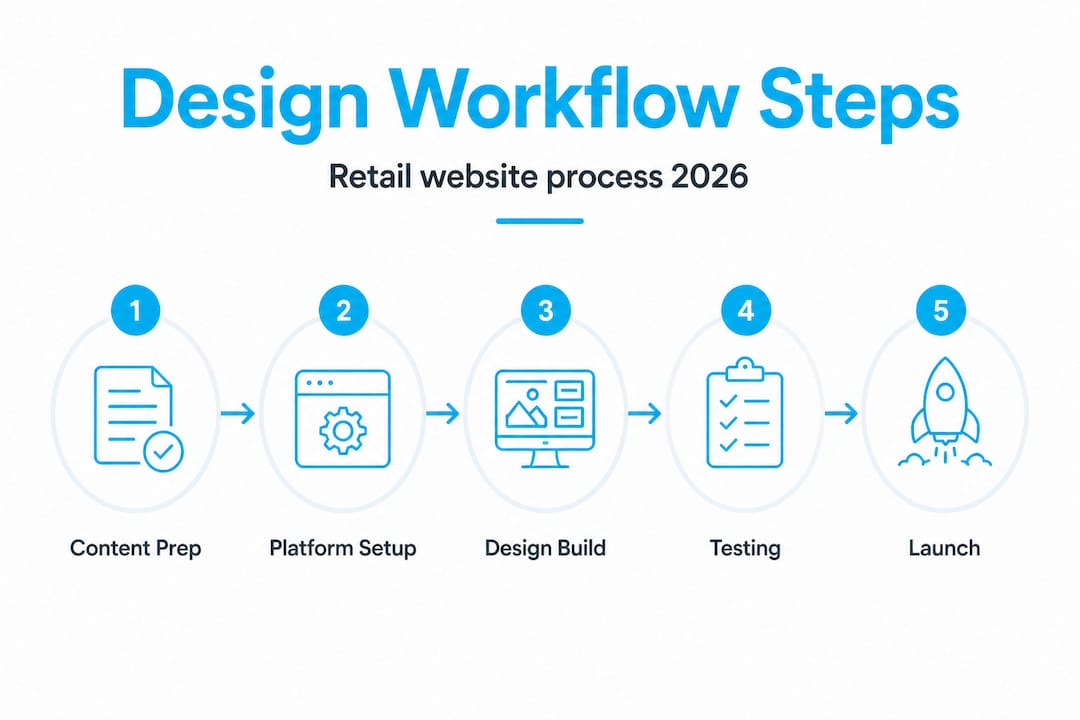
A step-by-step workflow for designing your retail website
With your essentials in hand, follow this workflow from start to finish for an organised and effective design journey.
This is the process that separates retailers who launch on time from those who are still tweaking their homepage six months later.
-
Research and discovery. Define your target customer, analyse competitors, and identify what your site needs to do. What products will you feature? What seasonal campaigns do you run? What does your customer expect from a checkout experience?
-
Planning and scoping. Create a sitemap, set your budget, assign roles, and agree on timelines. Document everything. This is your project blueprint.
-
Content planning. Gather product descriptions, photography, brand assets, and copy before design begins. Late content is the number one cause of project delays.
-
Wireframing and prototyping. Build low-fidelity wireframes for key pages: homepage, category pages, product pages, and checkout. Get stakeholder sign-off before moving to full design.
-
Visual design. Apply your brand colours, typography, and imagery to the approved wireframes. Focus on website design tips that build trust, such as clear calls to action, social proof, and professional product photography.
-
Development and integration. Build the site, integrate your payment gateway, connect inventory systems, and set up analytics tracking. This stage is where your ecommerce web design choices become real.
-
Testing. Test across devices, browsers, and screen sizes. Check load speed, checkout flow, form submissions, and all product filters. Involve real users if possible.
-
Launch and handover. Go live with a pre-launch checklist completed. Ensure redirects are set, SEO metadata is in place, and your team knows how to manage the site.
“The retailers who launch on time are not the ones with the biggest budgets. They’re the ones who did the planning work upfront and stuck to a clear process.”
Here’s a quick comparison of what happens at each stage with and without proper planning:
| Stage | Without planning | With planning |
|---|---|---|
| Content gathering | Delays design by weeks | Ready before design starts |
| Feedback rounds | Vague, repetitive, costly | Structured, clear, fast |
| Testing | Rushed or skipped | Thorough and documented |
| Launch | Stressful and error-prone | Controlled and confident |
Pro Tip: Build a pre-launch checklist specific to retail. Include items like: product images optimised for web, payment gateway tested with real transactions, mobile checkout confirmed on three different devices, and Google Analytics goals configured.
Common pitfalls and how to avoid them
Even with the best workflow, snags can happen. Here’s how to steer clear of the most costly missteps.
Most retail website projects don’t fail because of bad design. They fail because of avoidable process mistakes. Here are the ones we see most often.
Unclear requirements from the start. If you can’t describe exactly what your site needs to do before work begins, you’ll be paying for revisions later. Write a detailed brief. Include your target audience, required features, and non-negotiable design elements.
Late content delivery. Designers and developers cannot work without content. Product descriptions, images, and copy need to be ready before the design phase begins, not during it. Set a content deadline at least two weeks before design kicks off.
Choosing tools that don’t scale. A platform that looks affordable today can become a serious limitation as your catalogue grows or your traffic increases. Invest time in evaluating your platform against your three-year growth plan, not just your current needs.
- Always check whether your chosen platform supports bulk product uploads
- Confirm that third-party integrations (like accounting software or loyalty programmes) are available
- Test the platform’s speed under high traffic loads before committing
Neglecting mobile from the start. E-commerce optimisation data consistently shows that more than 60% of retail browsing happens on mobile. If mobile is treated as an afterthought, your conversion rate will reflect it.
“Designing for desktop first and adapting for mobile later is one of the most expensive mistakes a retailer can make. Always design mobile-first.”
Skipping user testing. You are not your customer. Before launch, get at least five real people to complete a purchase on your site. Watch where they hesitate. Fix what confuses them. This single step can dramatically improve your conversion rate.
Pro Tip: Record user testing sessions using a free tool like Microsoft Clarity. Watching real users navigate your site reveals friction points that no internal review will catch.
Measuring success: Metrics and post-launch optimisation
Workflow doesn’t end at launch. It’s vital to track results and adjust your approach for true retail success.
Launching your site is the beginning of the process, not the end. The retailers who win online are the ones who treat their website as a living asset, not a set-and-forget project.
Here are the key metrics every retail site owner should monitor:
- Conversion rate: The percentage of visitors who complete a purchase. Industry average for retail e-commerce sits between 1% and 4%. If you’re below 1%, something needs fixing.
- Bounce rate: The percentage of visitors who leave after viewing only one page. A high bounce rate on product pages signals a mismatch between your ads and your content.
- Average order value (AOV): How much each customer spends per transaction. Increasing AOV through upsells and bundles is often more cost-effective than acquiring new customers.
- Mobile performance: Load speed and checkout completion rate on mobile devices. Slow mobile load times directly reduce sales.
- Cart abandonment rate: The percentage of shoppers who add items but don’t complete checkout. The global average is around 70%, so reducing this by even a few percentage points has a significant revenue impact.
| Metric | What to aim for | How to improve |
|---|---|---|
| Conversion rate | 2% or above | Improve product pages, checkout flow |
| Bounce rate | Below 50% | Align ad targeting with landing page content |
| Mobile load speed | Under 3 seconds | Compress images, use a fast hosting provider |
| Cart abandonment | Below 65% | Add exit-intent popups, simplify checkout |
The high-performing eCommerce features that move these metrics include fast load times, clear trust signals, easy navigation, and a frictionless checkout. Review these metrics monthly, not annually. Set up automated alerts in Google Analytics so you’re notified of significant drops in performance.
Conduct a quarterly workflow review. Ask: what changed on the site this quarter? Did it improve or hurt performance? What’s coming up in the next season that needs planning now? This keeps your workflow active and your site competitive.
The uncomfortable truth about website design workflows for retailers
Here’s something most workflow guides won’t tell you: rigid, step-by-step templates often fall apart in the real world of retail. And following a process for the sake of process is just as damaging as having no process at all.
Retail is dynamic. A competitor drops prices on a Tuesday. A product goes viral on social media. A supplier changes your stock overnight. Your website needs to respond to these realities, and a workflow that doesn’t allow for rapid adaptation will slow you down when it matters most.
We’ve seen Australian retailers follow a textbook six-stage design process, only to launch a site that’s already out of date because the process took so long that their market had shifted. The workflow became the problem.
The real lesson is this: a workflow should give you speed and flexibility, not just structure. The best retail website projects we’ve been involved in treated the workflow as a guide, not a rulebook. Stages overlapped when it made sense. Testing happened earlier than scheduled when a major issue was spotted. Content was updated mid-build when a product range changed.
Why e-commerce design matters in 2026 is not just about aesthetics or technology. It’s about building a site that can keep pace with your business as it actually operates, not as you imagined it would operate when you first wrote the brief.
The retailers who thrive online are not the ones with the most elaborate workflows. They’re the ones who understand the purpose behind each step and know when to adapt. Build your workflow with intention, then give yourself permission to use your judgement.
Take your retail website to the next level
Equipped with all these insights, here’s how you can put them into practice with professional support.
Knowing the right steps is one thing. Executing them well, especially while running a retail business, is another challenge entirely. That’s where having an experienced team alongside you makes a measurable difference.
At Titan Blue, we specialise in web design services for retailers across Australia, from initial strategy through to launch and ongoing optimisation. Whether you need a full build or want to improve what you already have, our team brings a structured, results-focused approach to every project. Explore our website design and development services to see how we work, or dive straight into our e-commerce sales optimisation resources to start improving your results today. Get in touch now and let’s build something that actually works for your retail business.
Frequently asked questions
What’s the best first step in designing a retail website?
Start by clearly defining your business goals and your target customer’s needs before choosing any platform or design direction. Without this foundation, every decision that follows becomes a guess.
How long does it usually take to build a retail website?
Most retail websites launch within 8 to 12 weeks when a structured workflow is followed and all content is ready on time. Delays in content delivery are the single biggest cause of blown timelines.
How can I keep my website relevant after launch?
Review your site analytics regularly and update your content, products, and promotions at least once per season to stay competitive. A site that isn’t updated quickly becomes invisible to both search engines and returning customers.
Which design features boost retail website conversions?
Easy navigation, clear product images, fast load times, and mobile responsiveness are the features driving higher sales for retail e-commerce sites. These are not optional extras; they are baseline requirements.
Can I design my retail website myself or should I hire an expert?
Self-service platforms make it possible to build your own site, but hiring an expert delivers better quality, fewer costly mistakes, and stronger long-term results. For retail businesses with real revenue at stake, professional support pays for itself quickly.
Recommended
- Website design tips for retailers: boost sales and trust
- Role of website design for retailers in 2026
- Website Design in 2024: Future-Proof Your Business
- Proven Strategies to Improve Your Website Design in 2024
- Streamline your business website creation workflow in 2026
Make Titan Blue a preferred source in Google
One click tells Google to surface our articles more often in Top Stories, AI Overviews and AI Mode.

ChatGPT GPT-6 Search Upgrade: What It Means for Australia
OpenAI rolled out GPT-6 to ChatGPT on 7 October 2026 with faster search. Here is…

Best Dental Website Design Agencies in Australia: 7 Compared
Best dental website design agencies in Australia 2026: seven compared on dental proof, booking, AHPRA…

Childcare Centre Website Design Australia: The 2026 Guide
Childcare centre website design Australia: show hours, ages and enrolment as text so parents and…