

Last updated:
TL;DR:
- Many small Australian businesses have underperforming websites due to lack of local strategy.
- Effective local websites require clear goals, local SEO, fresh content, and ongoing maintenance.
- Professional support can help businesses build and sustain a high-impact local online presence.
Many Australian small businesses are invisible online. They have a Facebook page, maybe an old website, but nothing that actually pulls in local customers and converts them. The reality is that most local websites fail not because of budget, but because they were built without a clear local strategy. This guide walks you through every stage, from planning your site to launching it and keeping it visible. Whether you are starting from scratch or rebuilding what you have, you will leave with a clear, actionable path forward.
Table of Contents
- Understanding your local website needs
- Planning and preparing your website
- Designing and building your local website
- Optimising for local search and customer engagement
- Testing, launching, and maintaining your website
- What most local website guides miss
- Elevate your local website with professional support
- Frequently asked questions
Key Takeaways
| Point | Details |
|---|---|
| Plan for your audience | Start by understanding local customer needs and business objectives for your website. |
| Choose reliable tools | Select Australian domains and hosting for credibility and performance. |
| Focus on local SEO | Optimise content, claim your Google Business Profile, and encourage customer reviews. |
| Keep your site updated | Regular maintenance and new content improve security and help you stay found online. |
Understanding your local website needs
Before you touch a single template or type a domain name, you need to know exactly what your website is supposed to do. That sounds obvious, but most small business owners skip this step entirely. They end up with a site that looks decent but brings in nothing.
Start by defining your target audience. Who are your ideal customers, and where are they located? A Gold Coast plumber serves a very different audience than a Melbourne-based accountant. Once you know who you are speaking to, you can shape every part of your site around their needs and location.
Next, clarify your business goals. Ask yourself:
- Do you want more phone calls or booking enquiries?
- Are you trying to drive foot traffic to a physical location?
- Do you want to sell products directly through the site?
- Are you building credibility and trust with local customers?
With your goals written down, look at your competitors’ websites. Note what they do well and where they fall short. You are not copying them. You are setting the baseline and figuring out how to exceed it.
Your site will need a few non-negotiable features from day one. These include mobile-friendliness, fast load speeds, clear contact information, and strong boosting local search foundations. Good content marketing for business also starts at this planning stage, not as an afterthought. The Australian government’s online business tools offer useful starting points for understanding your obligations and opportunities.
Pro Tip: Write down three specific, measurable goals before you build. For example: “Receive 10 booking enquiries per month through the contact form” or “Appear on page one of Google for [your suburb] + [your service].”
Planning and preparing your website
With your goals clarified, it is time to map out the building blocks. This phase saves you significant time and money further down the track.
First, choose your domain name. For Australian businesses, a .com.au domain signals trust and local relevance to both customers and search engines. Include your location or service in the domain if it fits naturally, for example, “sydneycarpetcleaning.com.au”. Keep it short and easy to spell.
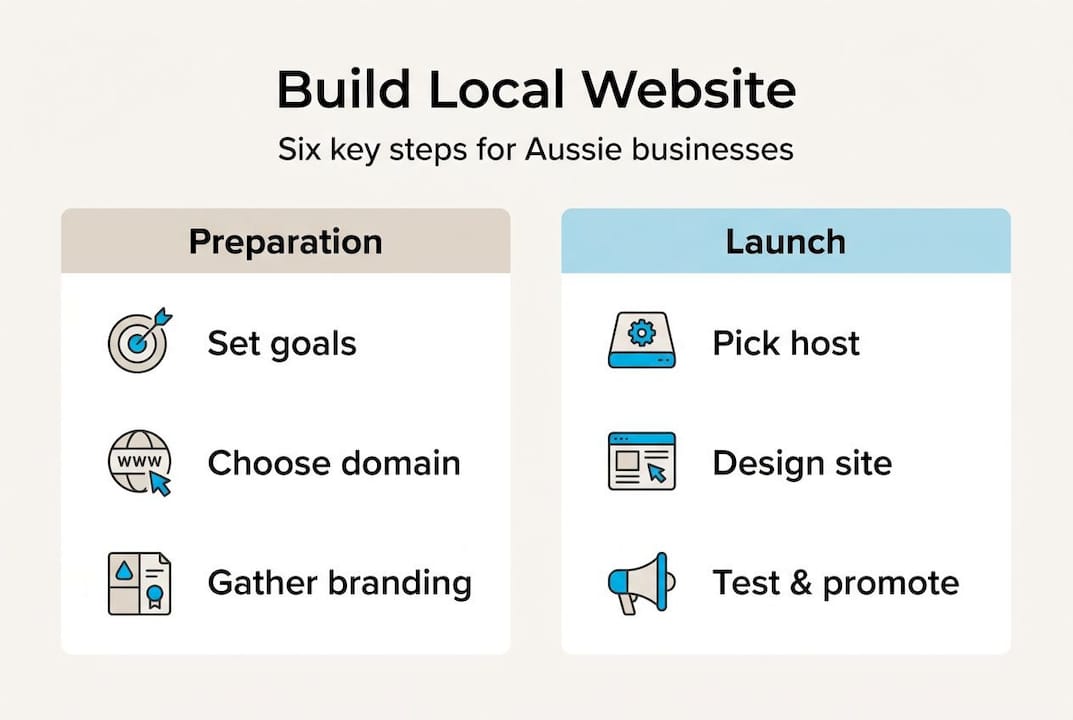
Next, select a hosting provider. Australian-based hosting matters because server location affects your site’s load speed for local visitors. Faster sites rank better and convert more. Look for providers offering strong uptime guarantees, local servers, and reliable customer support.
Now consider how you will actually build the site. Here is a quick overview of your main options:
| Platform | Best for | Approximate cost | Custom design? |
|---|---|---|---|
| WordPress | Flexibility, SEO | $50 to $300/yr hosting | Yes, with themes |
| Wix | Quick setup, beginners | $20 to $60/month | Limited |
| Shopify | E-commerce focused | $39 to $105/month | Moderate |
| Custom build | Unique requirements | $3,000 to $10,000+ | Fully custom |
For guidance on getting your online presence set up correctly, the Australian ecommerce guidance from business.gov.au is worth reading before committing to a platform.
Before development starts, prepare your brand assets. This means your logo, colour palette, fonts, business photos, and core copy. Having these ready prevents delays once building begins. Your digital marketing guide can help you align your website strategy with your broader marketing activity from the start.

Pro Tip: Secure your .com.au domain even if you are not ready to build yet. It costs very little and protects your brand name from being registered by someone else.
Designing and building your local website
With your plan in place, here is how to bring your local website to life efficiently.
Step-by-step build process:
- Set up your hosting account and connect your domain.
- Install your chosen platform or hand over specifications to your developer.
- Select a clean, professional template suited to your industry.
- Customise colours, fonts, and layout to match your brand.
- Build your core pages: Home, About, Services, Contact, and a local landing page if relevant.
- Add your content, images, and calls to action.
- Embed your Google Maps location and contact details clearly on every relevant page.
Design is not just about looking good. It is about guiding visitors to take action. Follow these steps for user-friendly design to make sure your site works for real people, not just for aesthetics. Apply these website design tricks to maximise usability and trust.
Your design must hit these essentials:
- Mobile responsiveness: Over 60% of local searches happen on mobile devices.
- Fast load times: Pages should load in under three seconds.
- Easy navigation: Visitors should find what they need in two clicks or fewer.
- Visible contact details: Phone number and location in the header and footer.
- Customer testimonials: Real reviews build immediate trust with new visitors.
Accessibility matters too. Use alt text for images, sufficient colour contrast, and readable font sizes. This broadens your audience and is considered best practice for local business websites.
Optimising for local search and customer engagement
Your website is live, but to reach local customers, you need effective visibility and engagement. A beautiful site that nobody finds is not doing its job.
Start with on-page optimisation. Every page title and meta description should include your location and service. For example, “Electrician in Brisbane | Fast, Reliable Service” tells Google exactly who you serve. Use these local keywords naturally in your headings, body copy, and image file names.
Your local SEO visibility depends heavily on your Google Business Profile. Claim it, verify it, and fill every field completely, including your business hours, photos, services, and description. Businesses with complete profiles are 70% more likely to attract location visits than those with incomplete ones. Keep your name, address, and phone number identical across your website and your profile.
Reviews are powerful. Ask every satisfied customer to leave a Google review and respond to each one, good or bad. This signals to Google that your business is active and trusted. Embedding a Google Map on your contact page also reinforces your local presence.
For ongoing engagement, add these to your site:
- Live chat or a simple enquiry form on every service page
- Location-specific calls to action such as “Book your [suburb] appointment today”
- A local news or events section to bring repeat visitors back
Following a solid SEO marketing guide will help you build on these foundations. For 2026-specific tactics, the local SEO tips we have published cover the latest changes in how Google ranks local results.
Pro Tip: Update your website with local events, seasonal promotions, or community news at least once a month. Fresh content signals an active business and encourages both Google and customers to return.
Testing, launching, and maintaining your website
After building and optimising, the final step is ensuring a smooth launch and lasting value.
Pre-launch checklist:
- Test every page on mobile, tablet, and desktop.
- Check all internal and external links for broken URLs.
- Confirm your contact form works and emails reach your inbox.
- Review your privacy policy and terms of service for website compliance.
- Run a speed test using a free tool and fix any issues above three seconds.
- Check that your Google Analytics or equivalent tracking is active.
Once live, do a soft opening. Tell your existing customers and social media followers first. Ask them to test the site and report any issues. This gives you real feedback without the pressure of a full public launch.
Maintenance is where most local businesses fall short. They launch and forget.
“Regular updates keep your site secure and relevant.”
Plan for monthly backups, software updates, and content refreshes. Check your analytics every month to see which pages attract traffic and where visitors drop off. Adjust accordingly. A proactive website care plans approach keeps your site performing at its best long after launch day.
Key ongoing tasks include:
- Updating service information and pricing when it changes
- Adding new testimonials and case studies regularly
- Monitoring and fixing any security vulnerabilities promptly
- Refreshing seasonal content to stay locally relevant
What most local website guides miss
Here is something few guides tell you plainly: most DIY local websites fail at genuine engagement, not technical execution. The builder works. The domain is registered. The pages load. But the content is thin, the photos are stock images, and nothing feels local.
Professional photography and original written content are not luxuries. They are the difference between a visitor who bounces in eight seconds and one who picks up the phone. Local customers want to see real faces, real premises, and real results. Generic content erodes trust faster than a slow loading speed.
The other critical mistake is treating a website as a one-time investment. The businesses that win locally treat their site as a living asset. They post updates, run promotions, respond to reviews, and invest in ongoing marketing hacks that keep them visible month after month.
Pro Tip: Budget at least 20% of your initial build cost for ongoing monthly maintenance and marketing. A $3,000 site with $600 per month in upkeep will outperform a $10,000 site that is never touched again.
Elevate your local website with professional support
If you would rather not go it alone, expert help can genuinely amplify your website results. Building a local website correctly from the start saves you from costly fixes later.
At Titan Blue, we help Australian small and medium-sized businesses build websites that actually attract and convert local customers. From user-friendly site design to applying proven website design tricks, we handle the technical and creative work so you can focus on running your business. Our full website development guide covers every stage of the process. Get in touch with our Gold Coast team today and let us build something that works for you.
Frequently asked questions
How much does it cost to build a local business website in Australia?
Costs generally range from $1,000 to $7,000 depending on design, features, and whether you use a website builder or hire professionals. The Australian ecommerce guidance outlines what to expect when setting up online.
What features are essential for a good local website?
Your website needs a mobile-friendly design, local contact details, Google Maps integration, and easy-to-find customer reviews. These are the basics outlined in local business website basics that every site should cover.
How do I get my website to appear in local search results?
Optimise your content for geographic keywords and set up your Google Business Profile to boost visibility in local searches. Consistent name, address, and phone number details across all platforms also strengthens your ranking.
How often should I update my local business website?
Aim to update your website at least monthly to maintain relevance, security, and SEO ranking. A structured website care plan makes this process straightforward and consistent.
Recommended
- How to build an ecommerce site in Australia: a complete guide
- Grow with web and digital marketing: A practical guide for Australian businesses
- Build Business Website: 6-12 Weeks & $1,500-$4,000 Guide
- Expert Website Design with WordPress for Aussie Businesses
Make Titan Blue a preferred source in Google
One click tells Google to surface our articles more often in Top Stories, AI Overviews and AI Mode.

ChatGPT GPT-6 Search Upgrade: What It Means for Australia
OpenAI rolled out GPT-6 to ChatGPT on 7 October 2026 with faster search. Here is…

Best Dental Website Design Agencies in Australia: 7 Compared
Best dental website design agencies in Australia 2026: seven compared on dental proof, booking, AHPRA…

Childcare Centre Website Design Australia: The 2026 Guide
Childcare centre website design Australia: show hours, ages and enrolment as text so parents and…