Stay ahead with the latest tips, trends, and insights from the Titan Blue team , straight from the studio in Broadbeach.



Many Gold Coast small to medium-sized businesses struggle to create websites that drive real growth. The core issue isn’t lack of effort but unclear goals and poorly planned content from the start. This guide presents a structured workflow designed specifically for Australian SMEs, showing you how to build websites that deliver measurable business success in 2026.
Table of Contents
- Understanding The Importance Of Website Design Workflow
- Prerequisites: What You Need Before Starting Your Website Design
- Step-By-Step Website Design Workflow For SMEs
- Mobile Responsiveness And Accessibility Standards
- Common Mistakes And How To Avoid Them
- Expected Timelines, Costs, And Measurable Outcomes
- Measuring Website Success And Next Steps
- Discover Professional Website Design Services On The Gold Coast
Key takeaways
| Point | Details |
|---|---|
| Structured workflow mitigates design challenges | A stepwise approach reduces costly mistakes and ensures goal alignment throughout your project. |
| Prerequisites drive success | Clear goals, audience insights, and content planning must happen before design begins. |
| Mobile and accessibility are non-negotiable | Responsive design and WCAG 2.2 Level AA compliance ensure legal compliance and broader reach. |
| Iterative testing improves outcomes | Regular feedback loops and usability testing enhance final website performance significantly. |
| Measurement guides growth | Analytics and user feedback reveal opportunities for continuous improvement and ROI tracking. |
Understanding the importance of website design workflow
Research reveals that 90% of Australian SMEs struggle with website fundamentals impacting their digital presence. For Gold Coast businesses competing in tourism, retail, and professional services sectors, this represents a critical barrier to growth. The root causes are surprisingly consistent across industries.
Unclear business objectives lead teams to build features nobody needs. Poor content planning creates confusing navigation that frustrates visitors. Mobile device dominance in Australia means over half your potential customers experience your site on smartphones first, yet many SME websites remain desktop-focused.
A structured workflow addresses these challenges systematically. You gain control over complexity rather than reacting to problems after launch. Planning stages force clarity around goals before investing in design. Defined review points catch usability issues early when fixes cost less.
Pro Tip: The workflow becomes even more powerful when combined with emerging web design gold coast australia approaches that integrate AI tools for content generation and accessibility testing, though these tools only work effectively when your foundation is solid.
Prerequisites: what you need before starting your website design
Successful website projects begin weeks before designers open their software. These preparatory steps determine whether your investment delivers returns or joins the millions wasted annually on ineffective sites.
Define specific business goals first. “Increase sales” lacks the precision needed to guide design decisions. Better goals specify targets like “generate 50 qualified enquiries monthly” or “reduce customer service calls by 30% through self-service resources”. Your website structure flows naturally from concrete objectives.
Know your target audience intimately. Create detailed user personas covering demographics, pain points, and online behaviour patterns. A Gold Coast café targeting tourists needs different navigation than an accounting firm serving local business owners. Understanding why to invest in website design benefits starts with knowing who you’re designing for.
Plan your content architecture before writing a single page. Map out your site structure using pen and paper or digital tools. Identify primary navigation categories, key landing pages, and conversion paths. Research relevant SEO keywords that match how your audience searches, then organise content around these terms naturally.
The 90% SMEs report unclear goals and content planning as major obstacles to website success. Equally critical, legal accessibility compliance through WCAG 2.2 Level AA standards became mandatory for Australian businesses from 2025. Understanding these requirements now prevents expensive retrofitting later.
Select project management tools early. Whether using Trello, Asana, or simple shared documents, establish systems for tracking tasks, collecting feedback, and maintaining version control. Clear communication channels reduce misunderstandings that derail timelines.
Pro Tip: Schedule a dedicated planning workshop with key stakeholders before engaging designers. Two hours spent aligning on goals and content strategy saves weeks of revisions later.
Step-by-step website design workflow for SMEs
This workflow breaks website creation into manageable stages, each building on previous foundations. Following this sequence systematically reduces risks whilst improving final outcomes.
Stage 1: Discovery and planning (weeks 1-2)
- Document business objectives and success metrics
- Research competitor websites and industry standards
- Create detailed user personas and journey maps
- Define content requirements and page hierarchy
- Establish project timeline and budget parameters
Stage 2: Content strategy and architecture (weeks 2-3)
Develop your sitemap showing every page and its relationships. Write content outlines for key pages identifying headlines, key messages, and calls to action. Conduct keyword research to inform page titles and structure. This groundwork prevents the scattered, unfocused content that plagues many SME sites.
Stage 3: Wireframing and design prototypes (weeks 3-5)
Create simple wireframes showing page layouts without colours or images. These focus attention on structure and user flow rather than aesthetics. Gather feedback from stakeholders and potential users. Revise based on input before moving to visual design.

Develop visual design mockups incorporating your brand colours, typography, and imagery. Present 2-3 design directions initially, then refine the chosen approach through iterative rounds. Research shows typical website design projects take 6 to 12 weeks with iterative feedback cycles proving essential for quality outcomes.
Stage 4: Development and building (weeks 5-8)
Convert approved designs into functional code. Build mobile-responsive templates that adapt seamlessly across devices. Implement accessibility features meeting WCAG 2.2 Level AA standards from the start. Integrate necessary functionality like contact forms, booking systems, or e-commerce capabilities.
Modern AI tools enhancing website design can accelerate development when your planning is thorough. However, AI cannot compensate for unclear objectives or poor content strategy.
Stage 5: Testing and quality assurance (weeks 8-10)
Conduct comprehensive testing across multiple devices and browsers. Review accessibility using automated tools and manual testing. Test all forms, links, and interactive features. Gather feedback from real users through usability testing sessions. Address identified issues before launch.
Stage 6: Launch and monitoring (weeks 10-12)
Deploy your website to production servers. Set up analytics tracking and search console integration. Monitor performance closely during the first weeks, addressing any technical issues immediately. Begin collecting user feedback through surveys or session recordings.
Exploring website design partnership options early helps you understand whether to build in-house or engage specialists. The website design gold coast guide offers deeper insights into local considerations.
Pro Tip: Assign clear roles within your team for each workflow stage. Defined responsibilities prevent bottlenecks where tasks stall waiting for unclear approval processes.
Mobile responsiveness and accessibility standards
Mobile devices now dominate Australian web traffic, with 55% of website visits occurring on mobile-only devices. Your Gold Coast customers browse whilst commuting, waiting in cafes, or relaxing at the beach. Desktop-centric design alienates over half your potential audience immediately.
Responsive design adapts your layout, images, and functionality to screen size automatically. Text remains readable without zooming. Buttons are sized for finger taps rather than mouse clicks. Navigation menus transform into mobile-friendly formats. This isn’t optional polish but fundamental functionality.
Mobile responsiveness checklist:
- Test on actual devices, not just browser emulators
- Ensure tap targets are minimum 44×44 pixels
- Optimise images to load quickly on mobile networks
- Simplify forms for easier mobile completion
- Verify readability without horizontal scrolling
Accessibility extends usability to people with disabilities whilst improving experiences for everyone. WCAG 2.2 Level AA compliance is now legally required for Australian businesses, but the benefits extend beyond avoiding legal issues.
| Accessibility Feature | User Benefit | Business Benefit |
|---|---|---|
| Alt text on images | Screen reader users understand visual content | Improved SEO from descriptive image context |
| Keyboard navigation | Users without mice can browse fully | Better usability for power users |
| Colour contrast standards | Low vision users read text easily | Enhanced readability for all users |
| Clear heading structure | Screen readers navigate efficiently | Better content organisation for everyone |
Implementing web design best practices for retailers naturally incorporates mobile and accessibility considerations from the start. Retrofitting these features later costs significantly more in both time and money.
Skipping mobile and accessibility testing harms engagement measurably. Users abandon frustrating mobile experiences within seconds. Search engines penalise sites that fail mobile-friendliness tests. Legal risks increase with non-compliant accessibility.
Pro Tip: Use free tools like Google’s Mobile-Friendly Test and WAVE accessibility checker during development. Catching issues early prevents expensive fixes after launch.
Common mistakes and how to avoid them
Australian SMEs lose millions annually to website design failures. Understanding these patterns helps you avoid repeating expensive mistakes.
Starting without clear goals: Many businesses begin with “we need a website” rather than “we need to achieve X through our website”. This produces pretty pages that don’t drive business results. Solution: Document 3-5 specific, measurable objectives before contacting designers.
Neglecting content planning: Businesses often expect designers to “figure out” what content to include. This backwards approach creates confusing site structures that frustrate visitors. Solution: Complete your content strategy and sitemap during the prerequisites phase, before design begins.
Skipping mobile responsiveness testing: Viewing your site on your desktop computer and assuming it works on mobile devices sets you up for failure. Over half your visitors experience a broken site you’ve never actually seen. Solution: Test on multiple real devices throughout development, not just at the end.
Ignoring accessibility requirements: Some businesses view accessibility as optional despite legal mandates. Poorly designed websites cost Australian SMEs millions annually through lost customers and legal issues. Solution: Integrate WCAG 2.2 Level AA standards from your initial wireframes forward.
Rushing launch without feedback: Pressure to go live leads businesses to skip user testing and stakeholder reviews. Small usability issues multiply into major problems after launch when fixes become more expensive. Solution: Build 2-3 weeks of testing and iteration into your timeline.
“The biggest mistake I see is businesses treating their website as a one-time project rather than an ongoing asset. They rush to launch, then wonder why results disappoint. Successful websites evolve through continuous improvement based on real user behaviour.”
Exploring smarter website design tips helps you anticipate and avoid these pitfalls before they impact your project. The UI/UX design mistakes impact guide provides additional context on how design thinking prevents costly errors.
Expected timelines, costs, and measurable outcomes
Realistic expectations prevent disappointment and support better planning. Website design projects for Gold Coast SMEs typically follow predictable patterns once you understand the variables.
Timeline expectations:
Most SME website projects require 6 to 12 weeks from kickoff to launch. Simple brochure sites with 5-10 pages trend toward the lower end. Complex sites with custom functionality, e-commerce, or extensive content need longer.
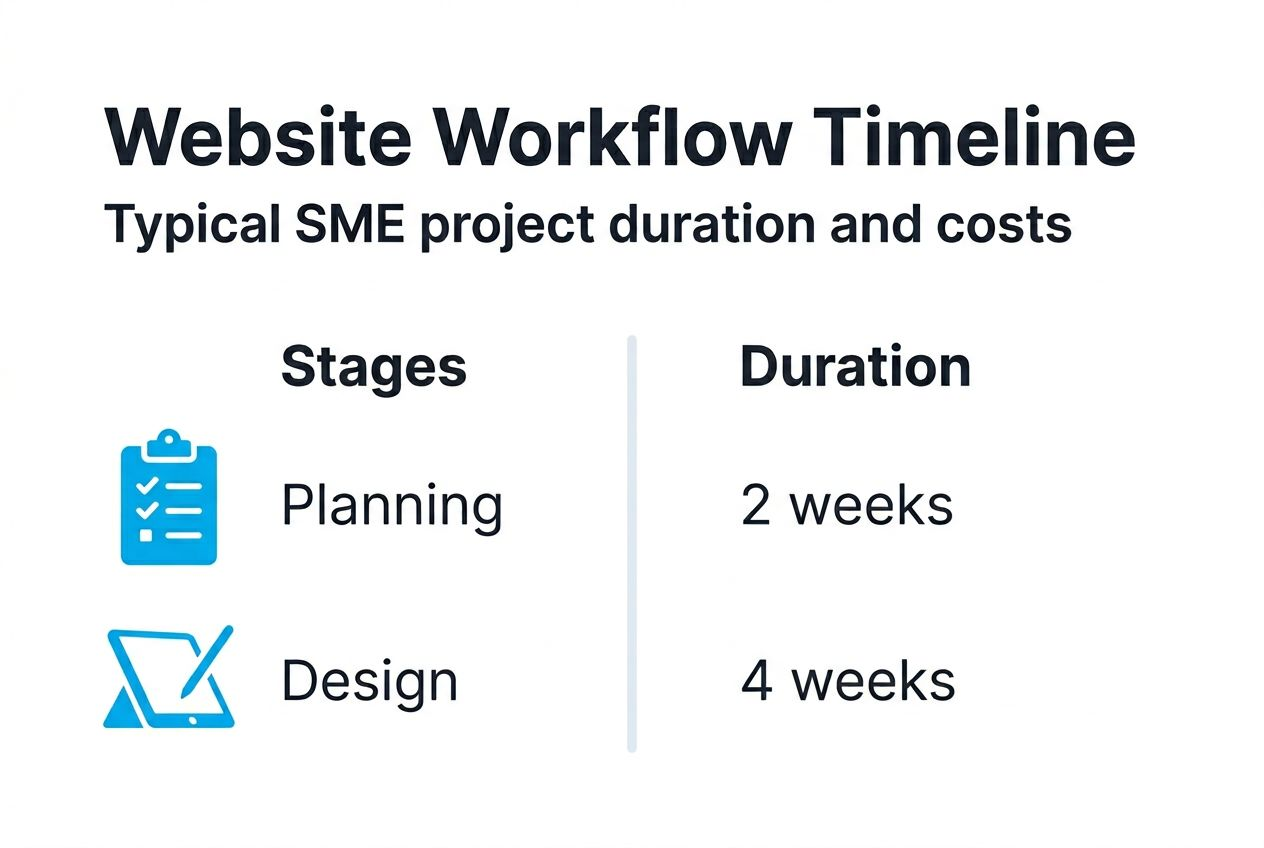
| Project Complexity | Typical Timeline | Key Variables |
|---|---|---|
| Basic brochure site | 6-8 weeks | Client feedback speed, content readiness |
| Business site with forms | 8-10 weeks | Custom features, integration requirements |
| E-commerce platform | 10-12 weeks | Product catalogue size, payment setup |
| Custom web application | 12+ weeks | Feature complexity, API integrations |
Your timeline extends when content isn’t ready, stakeholder approvals drag, or requirements change mid-project. Conversely, well-prepared businesses with clear goals and responsive decision-making often finish faster.
Cost considerations:
Website costs vary enormously based on scope, but planning and iteration reduce expensive rework. Cutting corners on strategy to save initial costs typically increases total spending through revisions and poor performance. Investment in proper workflow pays dividends through better outcomes and lower ongoing costs.
Measurable outcomes:
Data shows structured design boosts user engagement up to 27% compared to ad-hoc approaches. You should monitor these metrics to verify success:
- Bounce rate reduction of 15-25% post-launch
- Average session duration increase of 30-50%
- Conversion rate improvements of 20-40%
- Page load speed under 3 seconds
- Mobile traffic engagement matching desktop
Poor sites cause significant financial loss through missed opportunities and damaged credibility. Investing in proper workflow prevents these losses whilst positioning your business for growth.
Reviewing website design best practices helps you understand what quality looks like and set appropriate expectations for your project.
Pro Tip: Define your success metrics during the planning phase, then track them religiously after launch. Data-driven decisions outperform assumptions every time.
Measuring website success and next steps
Launching your website marks the beginning of ongoing optimisation, not the end of your project. Continuous measurement and improvement separate high-performing sites from stagnant ones.
Implement comprehensive analytics immediately. Google Analytics provides free tracking of visitor behaviour, traffic sources, and conversion paths. Set up goal tracking for key actions like form submissions, phone calls, or purchases. Monitor these metrics weekly initially, then monthly once patterns stabilise.
Key performance indicators to track:
- Bounce rate by page and traffic source
- Average session duration and pages per visit
- Top entry and exit pages
- Conversion rates for defined goals
- Mobile versus desktop engagement patterns
- Search engine visibility for target keywords
Collect qualitative feedback alongside quantitative data. User surveys reveal why people behave as analytics show they do. Session recordings show actual user interactions, highlighting friction points you might miss in aggregate data. Customer service teams hear complaints and questions that indicate website gaps.
Schedule quarterly reviews of website performance against business objectives. Your goals evolve as your business grows. Websites must adapt accordingly. What worked brilliantly at launch may need adjustment six months later based on market changes or new opportunities.
Plan iterative improvements rather than waiting for complete redesigns. Small, regular enhancements based on user feedback maintain website relevance and performance. Testing changes incrementally reduces risk whilst accelerating learning.
The website design and development guide explores ongoing optimisation strategies in greater depth, helping you maintain competitive advantage through continuous improvement.
Pro Tip: Create a simple monthly dashboard tracking your top 5-7 metrics. This habit keeps website performance visible and ensures issues get addressed promptly rather than discovered during crisis moments.
Discover professional website design services on the Gold Coast
Building an effective website workflow requires expertise across strategy, design, development, and optimisation. Many Gold Coast SMEs find partnering with specialists accelerates results whilst reducing internal burden.
Titan Blue offers comprehensive Gold Coast web design services tailored specifically for local businesses. Our approach integrates every workflow stage discussed in this guide, from initial goal definition through ongoing performance monitoring. We handle mobile responsiveness, accessibility compliance, and SEO foundations as standard practice, not optional extras.
Our website design and development guide details our methodology and case studies. For businesses seeking ongoing support, our website care plans provide regular updates, security monitoring, and performance optimisation to keep your site competitive as technology and markets evolve.
FAQ
How long does a typical website design project take for a Gold Coast SME?
Most SME website projects last six to twelve weeks, allowing for planning, design, development, and testing phases. Timelines vary depending on project complexity, content readiness, and how quickly stakeholders provide feedback. Well-prepared businesses with clear goals often finish faster.
What are the essential prerequisites before starting my website design?
Define clear business goals and detailed user personas before beginning design work. Plan your complete content structure and identify relevant SEO keywords that match audience search behaviour. Ensure awareness of WCAG 2.2 Level AA accessibility standards, which are legally required for Australian businesses from 2025.
How can I ensure my website is mobile responsive and accessible?
Test your website thoroughly on multiple devices including smartphones and tablets, not just desktop computers. Implement WCAG 2.2 Level AA standards from the initial design phase rather than retrofitting later. Use mobile-first design principles and conduct comprehensive usability audits before launch to catch issues early.
What common mistakes should I avoid in my website design workflow?
Avoid starting without documented, measurable business goals that guide design decisions. Don’t neglect content organisation and SEO keyword planning during the strategy phase. Never skip mobile device testing or accessibility compliance checks. Resist pressure to rush launch without gathering user feedback and conducting iterative improvements.
How do I measure my website’s success after launch?
Use analytics platforms to monitor bounce rates, average session duration, and traffic sources consistently. Collect qualitative user feedback through surveys and session recordings to understand behaviour patterns. Regularly assess SEO performance and verify alignment between website metrics and your original business objectives.
Recommended

Web Development Gold Coast: Build for Growth and AI Search
Web Development Gold Coast: fast, secure, conversion-ready websites built for customers, Google and AI search.…

Gold Coast Web Design: What Makes a Website Work?
Gold Coast web design should attract the right people, answer their questions, earn trust and…

Website Design Gold Coast: The Process, Timeline, and What Makes a Site AI-Ready
A website design project on the Gold Coast typically runs through six stages: discovery, information…